

PART II · TEACH IT YOUR WORK
A general model gives everyone the same average. Your facts, your rules and your voice, written down once, are how Claude stops sounding like everyone else.
When every creator has access to the same generic model, differentiation collapses. Every output trends toward the average. The creative economy becomes a sea of competent, indistinguishable work.
By the end of this chapter you can:
- Set up a Claude Project with standing instructions written in four parts.
- Split the background you keep pasting into a facts file, a rules file and a five-line voice file.
- Run a canary test that proves a chat is reading the Project instead of guessing.
- Keep a copy of the whole Project in your own
library/folder, so you can rebuild it in any tool.
Semantic memory is what makes an agent behave like a team member who knows your business rather than a generic AI executing instructions. Encode it carefully and update it regularly.
If you are starting here
This is chapter 4 of 15 in Book 2. A few ideas and two people from earlier chapters carry this one, and you can pick them up in two minutes.
- The four-part prompt. Every request in this series has four labeled parts. Job says what you want and who it is for. Material says what Claude may use, and nothing else. Shape sets the length, the order and the tone. Check says what to do when a fact is missing.
- `[CHECK]` markers. When Claude needs a fact it does not have, it writes
[CHECK: what is missing]right where the fact would go. You confirm each one before anything leaves your desk. The practice files in this chapter spell the same markerCHECK:, without the brackets. - Harbor & Home Cleaning is a business in Portland, Maine, run by an owner, Dana Ruiz. All names, companies, emails and phone numbers in these practice files are made up, and the prices exist only so you can check a draft against them.
- Sam Rivera Sam works retail, is partway through an evening bookkeeping certificate, and keeps Harbor & Home's books a few hours a week. Sam goes one step ahead of you in every book of this series and makes each mistake first.
You need a free Claude account and about an hour for all three exercises. Every file they use is printed in this chapter.
The email that needed four corrections
Kevin Marsh wrote to Harbor & Home on a Monday morning. He and his wife were selling their house in Scarborough, and the listing photographer was coming the week of November 16. They wanted a deep clean first. The house was about 2,800 square feet and they still lived in it, so it wouldn't be empty. He had four questions. What would it cost? A ballpark was fine. Could the team shampoo the living room carpet while they were there? Would paying cash get a better price? And did they bring their own supplies, because his wife got headaches from strong cleaning smells?
Dana opened a new chat, pasted the email and asked for a reply. The draft that came back was friendly, the right length and free of exclamation points. Then she read it against what she knew, and that is where it came apart. Nothing in that chat told Claude that Harbor & Home doesn't shampoo carpets, takes card or bank transfer and never cash, or publishes its deep-clean price only up to 1,500 square feet. The November schedule wasn't anywhere either. Every one of those facts was on Dana's laptop. None of them was in the room.
The practice files for this lesson name the four ways a reply to Kevin goes wrong when the chat can't see the business's documents: a full price for the 2,800-square-foot deep clean, a yes to the carpet, a yes to cash, and a confirmed week of November 16. Each one is a promise Dana would have to walk back.
The model did what it was built to do. It answered from the only material it had. Dana's answers live in three documents. Two of them, the approved business facts and a page of house rules, say what is true and what is allowed. The third holds two emails she wrote, which show how she sounds. She could paste all three into every chat, and on a calm Tuesday she would. On a busy Thursday she would paste last month's price list, or skip the rules page, and the draft would be wrong in a way that looks right. Pasting is where the mistakes start.
So this chapter moves those documents into a room Claude reads every time.
What a Project is
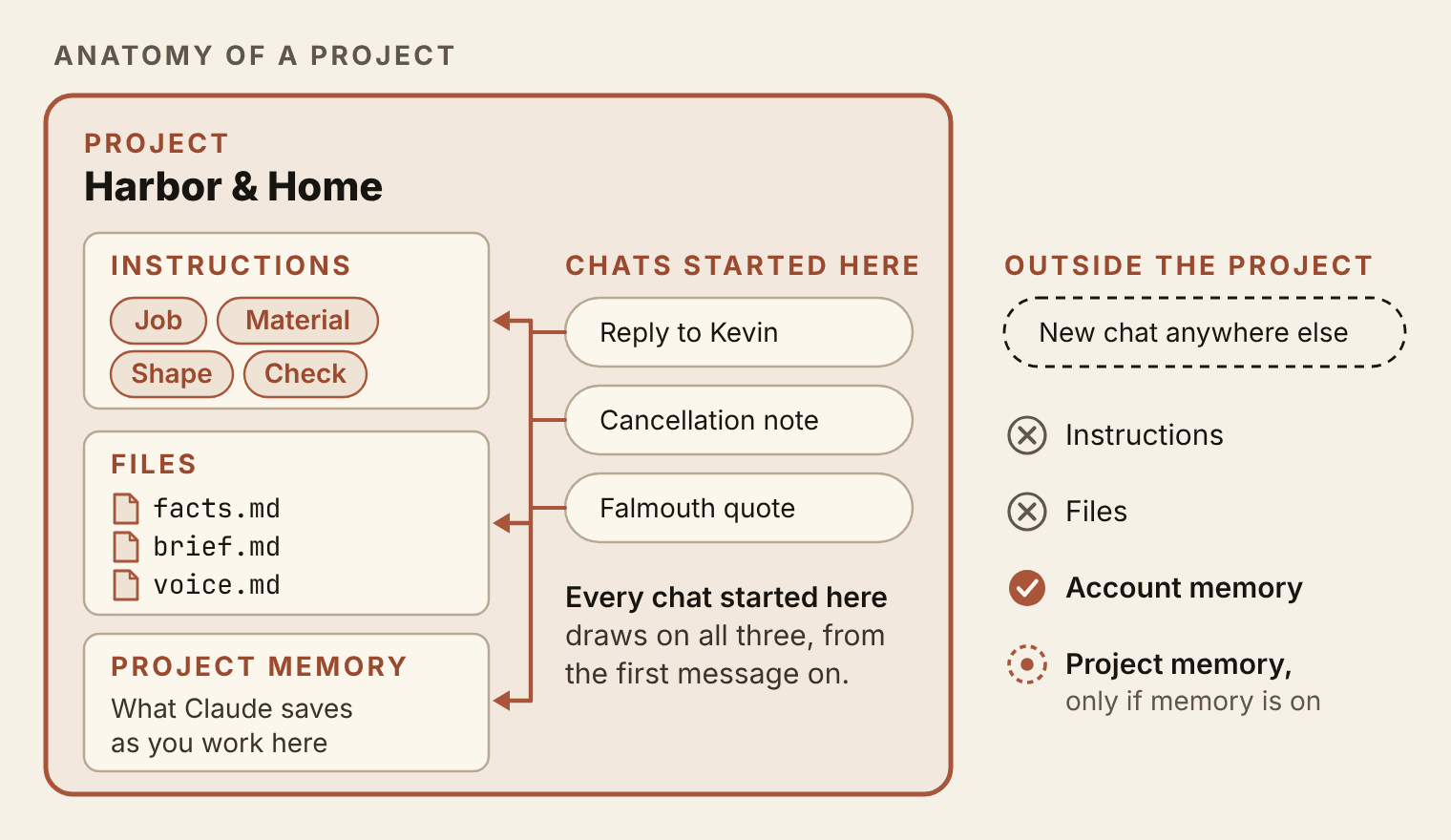
A Claude Project is a workspace with its own chats, its own uploaded files and its own standing instructions. It keeps its own memory too. When you start a chat from inside a Project, Claude works from its instructions and files from your first message on. A chat started anywhere else gets none of the instructions or files. It begins with your account settings and an empty desk, with one exception for memory that comes up in a moment. The rest of this chapter is about what to put in the room and how to prove it is being read.
I think about this the way I think about agents. In the agent guide at the back of Stake Your Claim, I broke an agent's memory into three kinds. Working memory is the task in front of it right now. The record of what it did before, and how that went, I called episodic memory. The one that matters here is semantic memory: the durable knowledge an agent applies to every task, like your prices, your rules and the way you write. Without it, an agent is a fast stranger. For everyday Claude work, a Project's instructions and files are semantic memory you write down yourself, and each chat is working memory that starts fresh.
A general model also drifts toward the well-made average it would hand anyone; in Stake Your Claim I called that pull the Morrissey Principle, and chapter 5 takes it further. A Project does not retrain Claude on your business. It puts your specifics in front of Claude at the start of every chat, and that is enough to pull the draft toward you.
The test for what deserves a Project is repetition. If you will do the job again next week with the same background, give it a room. Dana's is customer email. A freelancer might give each retainer client a Project of their own, and a family planning a cross-country move could keep every lease, quote and deadline in one. Questions you ask once can stay in plain chats.
The most important habit you can build early: use Projects. Every major workflow belongs in a Project, not a one-off chat.
Four things live inside a Project, and they behave differently. The instructions are standing orders that apply to every chat in the room. The files are what Anthropic calls project knowledge: documents Claude uses as context in every chat there. Project memory is what Claude saves on its own as you work, kept apart from your other Projects. The chats are the conversations, and each one starts clean. Claude may save a detail from one chat to project memory, but you can't count on one chat's back-and-forth reaching the next. If a fact matters, it goes in a file.
Two details trip people up early. The name and description you give a Project are labels for you. Claude can't see them, so a rule typed into the description does nothing. And memory travels further than files do. With memory on, Claude can draw on what it saved inside a Project when you chat outside it later. The files and instructions never leave the room. That is why everything Claude must get right goes in a file you wrote, and why the test later in this chapter turns memory off for its control chat.
Same job in ChatGPT
ChatGPT has Projects too, on its Free and paid plans: chats, files and instructions grouped around one job. Book 1, chapter 11, set one up. OpenAI also offers project-only memory, which keeps a Project from drawing on your other chats. The four files and the canary test in this chapter move across without a rewrite, which is the reason to keep the originals in your own folder.
Instructions in four parts
Project instructions are a four-part prompt that never expires. The prompts you wrote in Book 1 served one job each. Standing instructions serve every job in the room, so they describe the kind of work and the rules of the house rather than a single task.
Here are Harbor & Home's, as they go into the Project.
You help me, Dana Ruiz, owner of Harbor & Home Cleaning, write customer emails, quotes and short posts.

Job: Draft writing I can send after one quick read.

Material: Use only the facts in the business facts file in this project. Follow the project brief file. Match the tone of the voice sample file.

Shape: Emails under 175 words. Warm, direct and plain. No exclamation points. Sign off "Dana".

Check: If an answer needs a fact that is not in the business facts file (a price, a date, an opening), do not guess, and do not work it out from an example email. Write "CHECK:" and what's missing in the draft where the fact would go. Then list every CHECK item under the draft.
The opening line names a real person and the kinds of writing she needs. It skips the costume ("You are a world-class copywriter"). A named owner with named jobs tells Claude far more than an imaginary expert does.
Job sets the bar for every draft: Dana can send it after one quick read. That changes what "good" means. A beautiful email that needs ten minutes of fact-checking fails this Job, and a plain one she can send in thirty seconds passes.
Material names all three files and gives each its own verb. Claude uses the facts, follows the brief and matches the voice sample. That one sentence is a ranking. The facts file is the only place a fact may come from. The brief governs behavior. The voice sample governs tone and nothing else.
Shape trades adjectives for numbers wherever it can. "Under 175 words" can be checked. "Concise" can't. The sign-off is spelled out, because a draft that ends "Best regards, The Harbor & Home Team" is one more thing Dana has to fix.
Check does the most work, and one clause in it is there because of a trap. In the voice sample, Dana's email to a Mrs. Patel prices a deep clean of 1,800 square feet at $285. That was a quote for one home, and it sets no price for anyone else. The facts file lists deep cleans from $260 up to 1,500 square feet, and its $25 step for each extra 500 square feet appears only on the line for standard cleans. A model that is good at patterns sees $285 for 1,800 square feet and can work out a figure for Kevin's 2,800 in one step. The arithmetic is easy, and nothing in the facts supports it. "Do not work it out from an example email" turns that confident wrong number into a CHECK: Dana answers in ten seconds. The instructions write the marker as CHECK:, the way the practice files do. It is the same marker as [CHECK: ...], and Claude uses whichever spelling your instructions ask for.
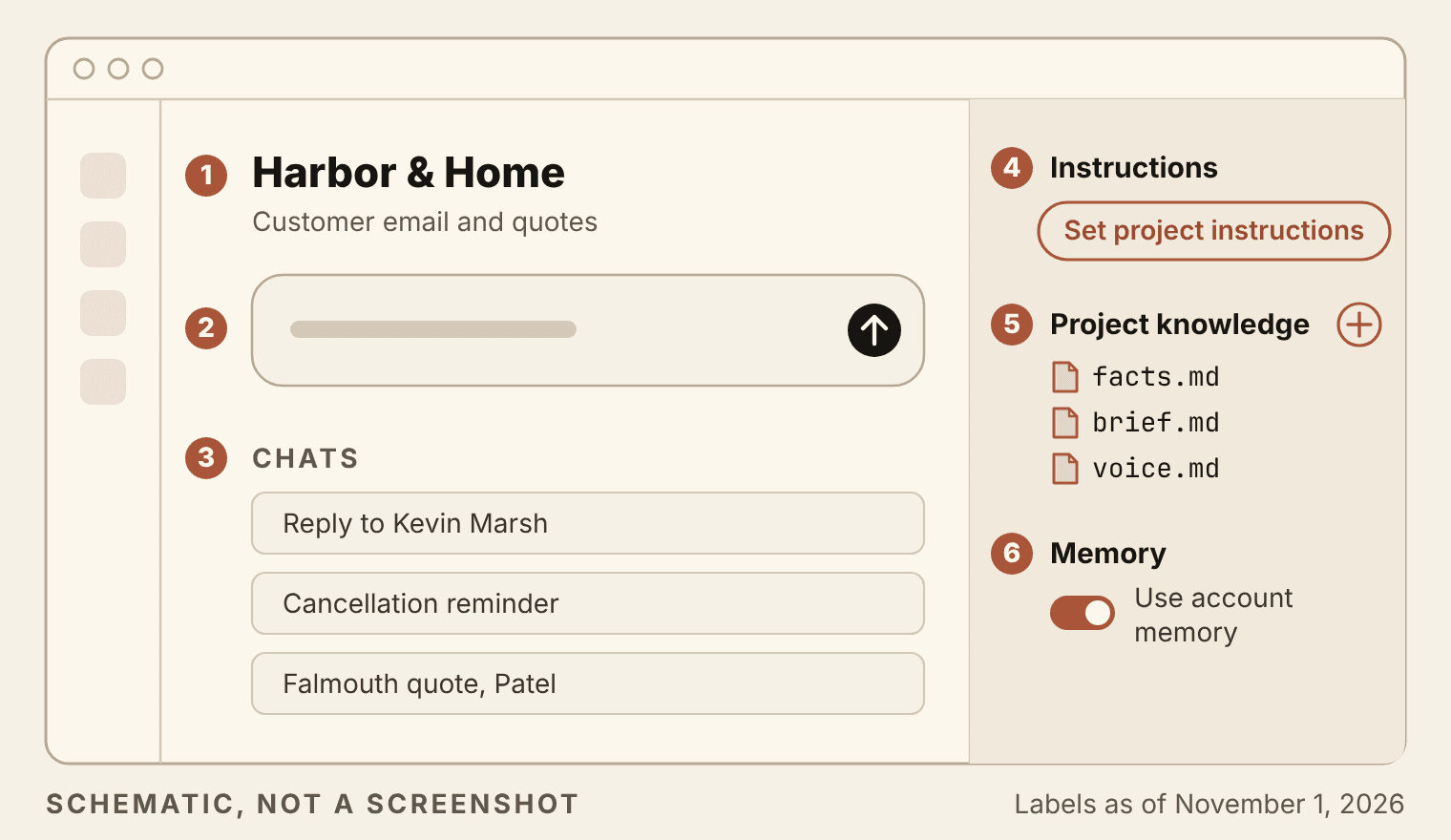
The numbers in Figure 4.2, in order:
- The Project's name and description. They help you find it. Claude can't see them.
- The message box on the Project page. Every chat for this work starts here.
- The Project's own chat list. A chat that isn't listed here was started somewhere else.
- The instructions panel, where the four-part instructions go. Save them before you close it.
- Project knowledge, with a button for adding files.
- Memory for this Project, including the switch that lets it draw on your account memory.
Watch out: one fact, one home
Keep facts out of the instructions. If your instructions say "deep cleans start at $260", that price now lives in two places, and the day it changes you will update one of them. Instructions say how to work. Prices, hours and policies go in the facts file, and anything Claude must always or never do goes in the brief.
I treat instructions the way I treat code. The agent guide in Stake Your Claim says to put real time into an agent's instructions, keep versions of them and review them on a schedule, and the same goes for a page of Project instructions. Keep the master copy in a file you own and date each change. When a draft goes wrong, fix the instructions before you fix the draft, because a fix typed into one chat stays in that chat.
Three files, one job each
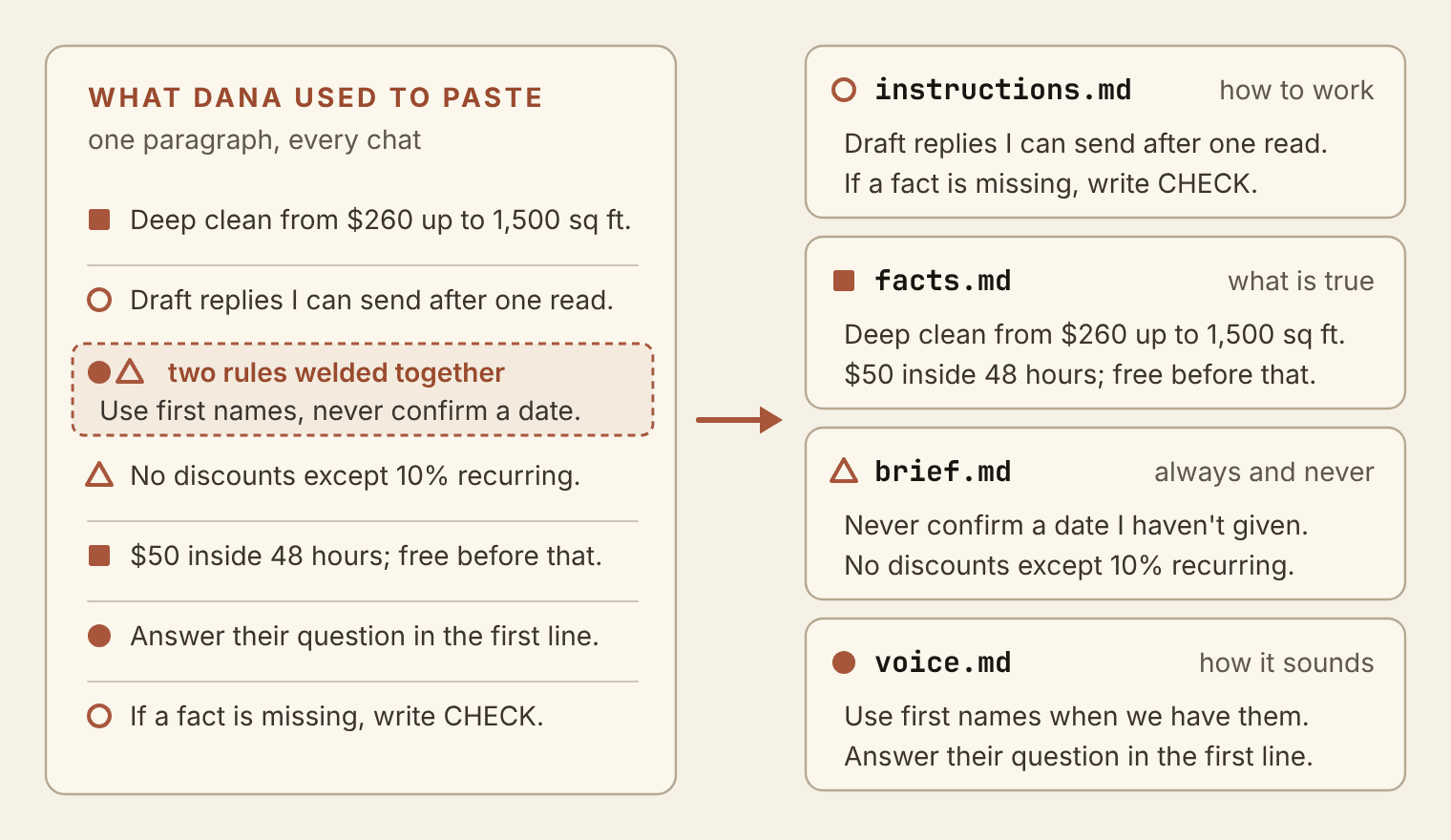
Many people keep their background as one long paragraph they paste at the top of every request. It mixes prices with pet peeves and rules with tone. Before any of it goes into a Project, split it. Every sentence answers one of four questions, and each question has a home:
- How should Claude work? The instructions, which you just wrote.
- What is true? Prices, hours, the service area and policies belong in
facts.md. - What do we always or never do? House rules go in
brief.md. - How does it sound?
voice.md, which this chapter keeps to five lines.
facts.md: what is true
This is Harbor & Home's approved facts file, unchanged from the practice files except for the note under the title. Notice how it is written. Every service price is a "from" price with the square footage it covers. Rules are short sentences: "No cash." "No service on the islands." Claude can quote a line like that, and Dana can check it in a second.
HARBOR & HOME CLEANING: APPROVED BUSINESS FACTS


Owner: Dana Ruiz
Location: Portland, Maine. Office at 214 Fore Street, Suite 3 (no walk-in service).
Phone: 207-555-0142   Email: hello@harborhome.example.com
Office hours: Monday to Friday, 8:00 a.m. to 5:00 p.m. Phone messages returned within one business day.
Team: 7 cleaners (all employees, not contractors), plus Dana.
Insured and bonded: yes (general liability and bonding; certificate available on request).

SERVICE AREA
Portland, South Portland, Westbrook, Falmouth, Cape Elizabeth.
Scarborough and Yarmouth by request, with a $15 travel fee per visit.
No service on the islands.

SERVICES AND PRICES
Standard home clean: from $140 (up to 1,500 sq ft). Add $25 per extra 500 sq ft.
Deep clean: from $260 (up to 1,500 sq ft). Includes inside oven, baseboards, interior windows.
Move-out / move-in clean: from $320 (up to 1,500 sq ft). Empty homes only.
Small-office clean: quoted after a free walk-through. Evenings only (after 5:30 p.m.).
Add-ons: inside fridge $35, inside cabinets $45, laundry fold $25 per load.
Recurring discount: 10% off standard cleans booked weekly or every two weeks.
Minimum visit: $120.

HOW BOOKING WORKS
New clients book a first visit by phone or email. First visits for homes over 2,500 sq ft need a free 15-minute video walk-through.
Payment by card or bank transfer after each visit. No cash.
Cancellation: free up to 48 hours before the visit. Inside 48 hours, a $50 fee.
Lockouts (team cannot get in): charged at the full visit price.

SUPPLIES
Team brings all supplies and equipment.
Default products are fragrance-free. Clients may supply their own products.
Pet-safe products used on request.

WHAT WE DO NOT DO
No mold remediation, biohazard cleaning, carpet shampooing, exterior windows, or work above 8 feet on a ladder.
No pet waste cleanup.

GUARANTEE
If something was missed, tell us within 24 hours and we return to fix it at no charge.

NEW IN SPRING
Move-out cleaning package for renters: move-out clean plus inside fridge and inside cabinets for $380 (up to 1,500 sq ft). Launches March 1.
brief.md: what we always and never do
The brief holds the house rules: who the writing is for, and what a draft must never do even when the customer asks. Dana's seven rules cover the mistakes she most wants to stop. The first is the one that would have saved Kevin's draft.
HARBOR & HOME CLEANING: PROJECT BRIEF
How Dana wants customer writing handled. Read this with the business facts file.

This project drafts replies to customer emails, first-visit quotes, reminders and the occasional short post. Dana reads every draft before it goes out. Nothing is sent automatically.

Most readers are homeowners and renters around Portland, plus a few small offices. Many are booking a cleaning service for the first time. Some are busy and skim. Some are upset about a missed spot.

STANDING RULES
1. Never confirm a date or time unless Dana supplied it in the request. The schedule is not in these files.
2. Never offer a discount except the 10% recurring discount in the facts file.
3. Homes over 2,500 sq ft: mention the free 15-minute video walk-through before the first visit.
4. If someone asks for something we don't do, say so plainly and briefly. Don't suggest other companies.
5. Complaints: own it in the first sentence, then the fix. Mention the 24-hour guarantee if it applies.
6. Never mention other clients by name or share anything about their homes.
7. Small offices: we quote after a free walk-through, and we clean evenings only.
voice.md: five lines and two emails
The voice file is short on purpose. Five lines describe how Dana writes, and two real-style emails show it. The five lines give Claude rules it can follow. The emails give it something to imitate, which is why the instructions fence them off from facts.
HARBOR & HOME CLEANING: VOICE SAMPLE
How Dana writes, in five lines, then two emails she wrote. Use these to match tone.

1. Answer the question they asked in the first line or two, and end with one next step.
2. Warm, direct and plain. Most emails run four to eight sentences.
3. No "Dear valued customer." First names when we have them.
4. Prices are "from" prices, with the square footage they cover and what the price includes.
5. Sign off "Dana". On a first contact, add Harbor & Home Cleaning and 207-555-0142.

---
Hi Mrs. Patel,

Thanks for getting in touch. We can do a deep clean at your Falmouth home. For 1,800 square feet, the price starts at $285. That covers inside the oven, baseboards and the inside of your windows.

We have openings on Tuesday the 14th and Thursday the 16th, both starting at 9 a.m. Let me know which works and I'll put you on the schedule.

Dana
Harbor & Home Cleaning
207-555-0142

---
Hi Tom,

You're right, the team missed the upstairs bathroom on Friday. That's on us. Sarah can come back Wednesday morning to finish it at no charge. Does 10 a.m. work?

Thanks for telling me so quickly.

Dana
Two of the five lines echo the Shape part of the instructions: the tone words and the sign-off. A style rule may sit in both places, because the instructions send Claude to this file and the two agree. A fact never gets a second home.
Five lines is a start, not a voice. They get a draft from "generic small business" to "a careful version of Dana," and chapter 5 takes the rest of the distance. Each file opens with a title line that matches what the instructions call it ("business facts", "project brief", "voice sample"), so Claude never has to guess which file is which.
When two files disagree, the order is fixed. The facts file beats the voice sample, every time. A newer correction beats an older line, so when a price changes, edit the line and the date at the top instead of adding a second price below it. A fact that is in no file at all becomes a CHECK: in the draft. Settle the order once and most conflicts never reach Dana.
Once the files are in the Project, Dana stops pasting. She opens Harbor & Home, starts a chat, pastes Kevin's email under one line of request and sends it. The background is already there, and it is the current version, because the room holds one copy of it.
Without Projects, you re-explain everything every conversation. With Projects, Claude already knows. You open a chat and start working.
Some things stay out of every file. Card numbers, passwords and anything about a client the job doesn't need have no business in a Project. Dana's brief forbids naming other clients in a draft, and the surest way to keep that rule is never to upload a client list. Chapter 6 covers memory and what to refuse in more depth.
The canary test
Miners once carried canaries underground because the bird reacted to bad air before people could smell it. A canary question does the same job for a Project. It is a small question whose answer shows, in seconds, whether a chat is reading your files or making a good guess.
A good canary asks for something that exists only in your files, a detail no web page states and no common practice would suggest. It also asks for something you can check at a glance, such as a number or a deadline, so a wrong answer looks different from a right one. If your refund policy is the same as everyone's, a chat can guess it, and the canary tells you nothing.
The practice files give Harbor & Home a canary for the inside run: ask for a two-sentence reminder to clients about the cancellation policy. A right answer names free cancellation up to 48 hours before the visit and a $50 fee inside 48 hours. That is a quick check that a chat inside the Project is reading the facts file.
The answer key in the practice files puts that check in one sentence: "If this answer is generic (no 48 hours, no $50), the chat is probably outside the project."
As a control, though, the cancellation question is weak. A 48-hour window with a late fee is about as common as cleaning policies get, and a chat with no files can land on 48 hours and $50 by luck. To prove the answers come from the files, ask something only these files can answer: "Do you serve Scarborough, and is there a fee?" The facts file says Scarborough is served by request, with a $15 travel fee per visit. A chat outside the Project has no reason to say $15.
Run the Scarborough canary twice. The first run is a new chat started from the Project page. The second is the control: a new chat outside any Project, with memory turned off for that one chat before you send anything. The memory step matters. With memory on, Claude can draw on what it saved inside a Project when you chat outside it. If you have been writing about Scarborough in Harbor & Home, an ordinary outside chat might know the $15 from memory, and the test would tell you nothing about the files. The control has to be blind.
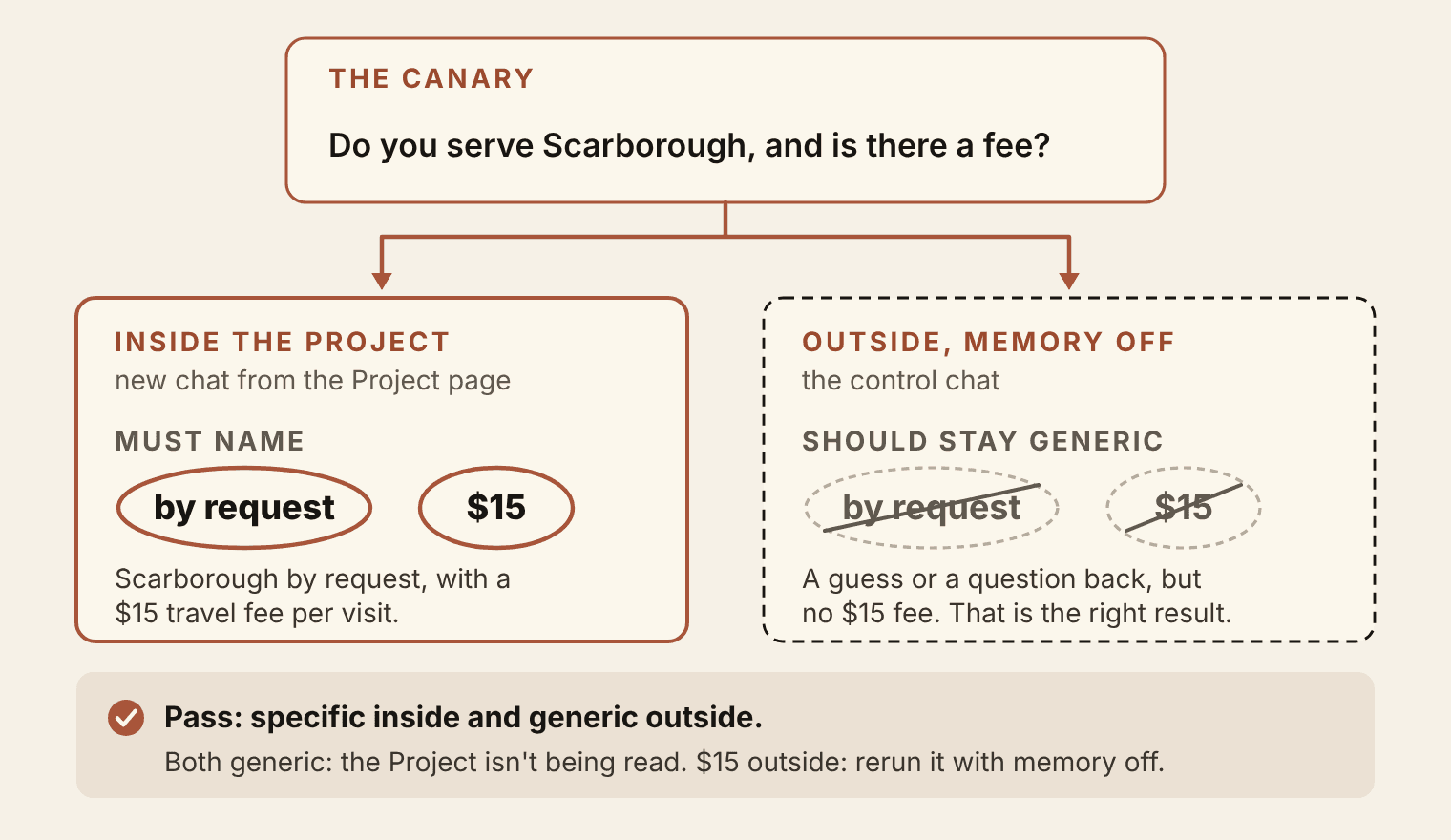
A pass looks like this: the inside answer says Scarborough is by request and names the $15 travel fee, and the outside answer names no $15 fee. If both are generic, the Project isn't being read. If the outside answer names the $15 fee, your control probably wasn't blind, so check that memory was off for that chat and run it again. A control that names one common figure, like a 48-hour notice window, is not proof of a leak. Repeat it in a fresh chat with memory off before you blame memory.
When the inside answer comes back generic, check three things in order. First, where the chat started. A chat you began from the Project page shows up in the Project's own chat list, and one that isn't in that list was started somewhere else. Go back to the Project page and start a new chat there. Second, whether the files made it in. Open the Project and look at its project knowledge. A file you attached to a single chat belongs to that chat only, and an upload that failed isn't there at all. Third, whether the instructions were saved. A box you pasted into and closed without saving holds nothing.
Now send Kevin's email
The canary proves the files are in play. Kevin's email proves they are being used well. Start one more new chat in the Project, type "Draft a reply to this email:" and paste his message under it. The wording you get will differ from anyone else's. These are the checks that matter, taken from the practice files' answer key.
- It says Scarborough is served by request, with a $15 travel fee per visit.
- It gives the deep clean as "from $260" for up to 1,500 square feet, says what that includes, and puts the price for about 2,800 square feet in a
CHECK:instead of a number. - It mentions the free 15-minute video walk-through, because the home is over 2,500 square feet.
- It says plainly that the team doesn't shampoo carpets, and suggests nobody else.
- It explains payment is by card or bank transfer after the visit, so there is no cash price to discount.
- It says the team brings all supplies and that the default products are fragrance-free.
- It leaves the week of November 16 as a
CHECK:, because the schedule isn't in any file. - It ends with one next step, such as setting up the walk-through, stays under 175 words and signs off "Dana" with the business name and phone.
It should also leave out the move-out clean. The house isn't empty, and move-out cleans are for empty homes only.
If the reply quotes a price for the big house, agrees to the carpet or confirms a date, first make sure the chat is in the Project's list. If it is, send the practice files' repair request below as your second message. Like the instructions, it spells the marker CHECK:, which means the same as [CHECK: ...].
Check your draft against the business facts file in this project, line by line.
1. Remove any price, service, payment option or date that is not written in that file.
2. Do not work out a price from the example emails in the voice sample file. Where an exact price is missing, write "CHECK:" and what's missing.
3. If the customer asked for something the facts file says we don't do, say so plainly in one sentence.
4. List every CHECK item under the draft.
Keep it under 175 words and sign off "Dana".
A draft with two CHECK: items under it is a good result. Dana can confirm a price and an opening in a minute. She can't easily unsay a price that a buyer already forwarded to his wife.
One canary works like a smoke alarm: it tells you something is wrong, and little more. In the agent guide in Stake Your Claim, I ask for ten to fifteen test scenarios before an agent goes live, and a rewrite of its instructions if it fails more than one in five. A canary is the smallest version of that habit. Keep a short list in canary.md: one question per file, each with the answer it must contain. Run the list whenever you add a file or change the instructions. It takes three minutes, and it catches the file that never uploaded or the instruction you forgot to save.
Sam's step: a price worked out from an example
On one of Sam's first afternoons in Dana's office, a request came in for a deep clean of a 2,300-square-foot house in Westbrook. Dana was out, so Sam tried a plain chat: the facts file and the voice sample pasted at the top, then the customer's email, then "Draft a reply."
The draft read well and quoted $310. No file says $310. The chat started from Mrs. Patel's $285 for 1,800 square feet, borrowed the $25 step that belongs to standard cleans, added it once for the extra 500 square feet and wrote the result down as a price. Sam's paste carried the files but not the rule that forbids that move.
Sam sent the same request from a new chat inside the Harbor & Home Project. This draft gave the deep clean as from $260 for up to 1,500 square feet and put a CHECK: where the 2,300-square-foot price would go. Same email, same model. What changed was the Check part of the instructions, which the Project applies to every chat and Sam's paste had left out. Dana answered the CHECK: in a minute when she got back.
Mirror it in your library
Everything in the Project also lives in a folder you control: library/projects/harbor-home/. Five files: instructions.md, facts.md, brief.md, voice.md and canary.md. The first four match the Project one for one. The fifth stays out of the Project, because it is your test and Claude never needs to read it.
The rule that keeps the two in step is short. Change the file first, then the Project. When Dana raises the deep-clean price, she edits facts.md in the library, updates the date line, and uploads the new file to replace the old one. Then she runs the canary list. The order matters because the folder is the original and the Project is a working copy inside one company's app.
Every app renames things, Claude included. On September 16, 2026, Anthropic began merging Claude's chat and Cowork modes into one conversation, and several labels in the practice files behind these lessons stopped matching the screen. The folder didn't notice. If Claude disappeared tomorrow, Dana could rebuild the whole setup in another tool from five text files, ChatGPT included, in about the time it takes to make coffee. Chapter 15 makes that a timed drill. Book 3 goes one step further and turns instructions.md into the rules file a coding agent reads before it touches anything.
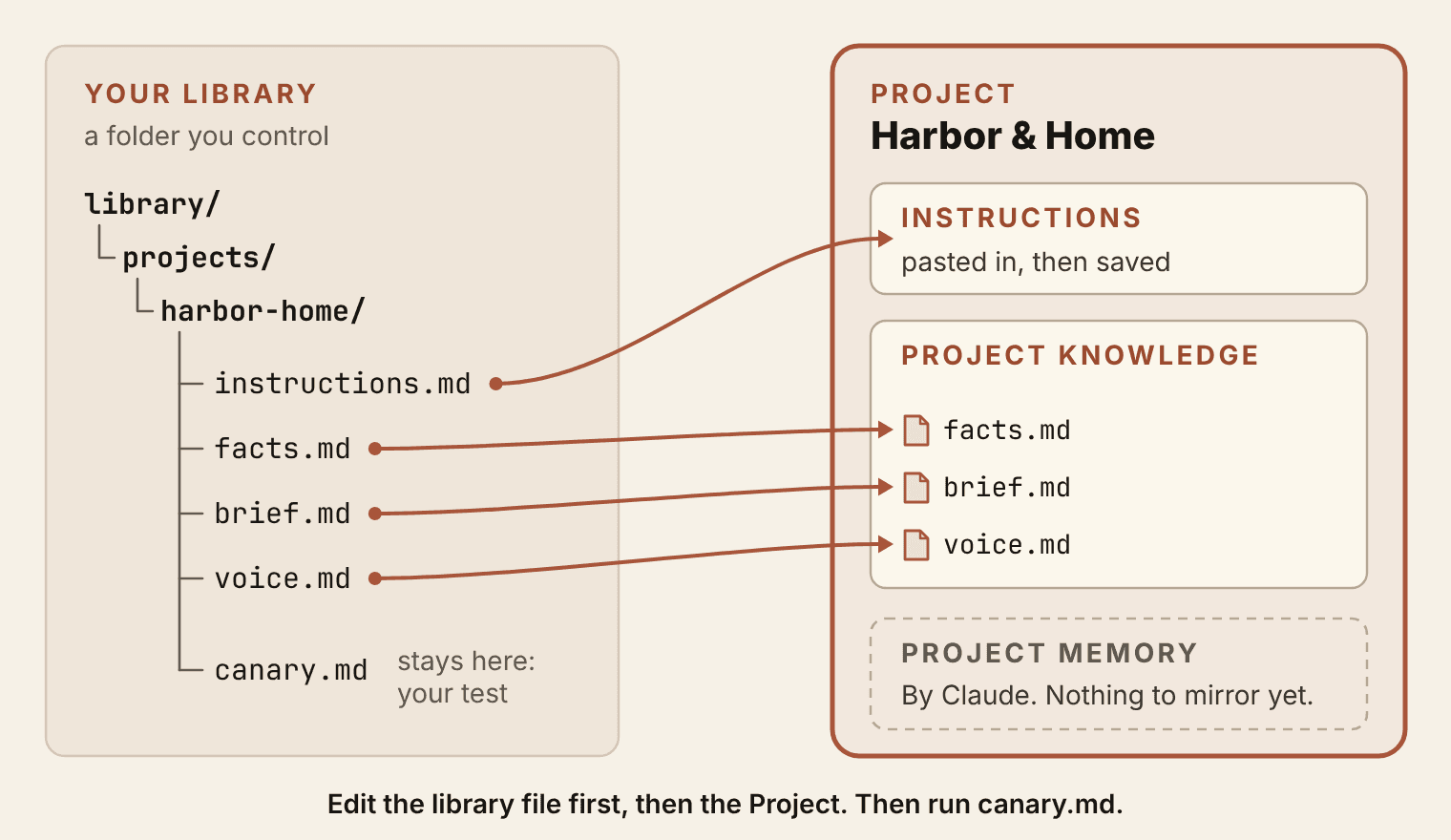
canary.md stays in the folder, because it is the test you run on the Project. Project memory is Claude's to write, so there is nothing to mirror yet; chapter 6 reviews it and chapter 15 exports it. Open full size: The harbor-home library folder's files joined by lines to the Project's instructions and knowledge; canary.md stays in the folder.Save this
Your library/ grows by one folder in this chapter.
library/projects/harbor-home/withinstructions.md,facts.md,brief.md,voice.mdandcanary.md.library/projects/your-project/with the same five files for your own work, and three canaries that pass.
Where this pays
Book 5, chapter 12, Deliver With Agents: a client's Project built this way, with its folder and its canary set, is a delivery asset the client keeps after you leave.
As of November 2026
Checked against Anthropic's help pages on November 1, 2026. Screens change, so the steps in this chapter use the labels Anthropic uses today.
- Plans. Projects come with every plan. Free accounts can make up to five. Paid plans add retrieval: when a Project's files approach the context limit, Claude switches to searching them, which Anthropic says expands capacity by up to 10x.
- Creating one. Open Projects in the sidebar, or go to claude.ai/projects, and click + New Project. Claude can't see the name or description you give it.
- Instructions and files. Set project instructions, then Save instructions. Files go into project knowledge, on the right side of the Project page, through its + button.
- Memory. On by default for Free, Pro, Max and Ultra. Each Project has its own memory and also uses your general memory. To keep a Project fully separate, turn off Use account memory under Memory on the Project's page. With memory on, Claude can refer to a Project's memory in chats outside it.
- One chat without memory. Before the first message, click + in the message box, then Memory. It works inside and outside Projects, and it can't be changed once the chat starts.
- Old chats. To move a chat into a Project, open the menu next to the chat's name and choose Add to project.
- Teams. On Team and Enterprise plans, a Project can be shared with Can view or Can edit access. ## Landing
You can now:
- Build a Project and prove with a canary test that its answers come from its files. That is can-do 2.4.
- Write standing instructions in four parts for one recurring job.
- Split the background you used to paste into facts, rules and voice, with one home for every fact.
- Keep a library copy of any Project and rebuild it in whatever tool you use next.
Carry forward: library/projects/harbor-home/, plus one Project of your own with three passing canaries.
Next: Chapter 5, Your Voice, Written Down. Five lines got Dana's drafts to sound like a careful version of her. Chapter 5 writes the full page: the arguments you make, the words you reach for and the ones you never use, and a blind test a friend can't pass.
Book 2 of 5 · Chapter 4 of 15