

By the end of this chapter you can:
- Explain in three steps how Claude Code and Codex decide to load a skill.
- Write a
SKILL.mdwhose description names the job, the trigger and where the job ends. - Keep one skill folder that both agents load, with your Book 2 skill beside it.
- Run a trigger test: one request the skill should take, one near miss it should refuse, one it should ignore.
Single prompts don’t build enterprise systems. Layered prompt architecture does.
If you are starting here
This is chapter 7 of 16 in Book 3. Four ideas from earlier in the series carry it, and you can pick them up in two minutes.
- A keeper is a tested prompt you saved in
library/keepers.md, written in four labeled parts: Job, Material, Shape and Check. Keeper #1, from Book 1, drafts a reply to a customer email. - `[CHECK: ...]` is the marker an AI writes where a fact is missing, right where the fact would go. You confirm each one before anything leaves your desk.
- The library repo. In chapter 2, your
library/folder became a private git repository. Chapter 5 gave it anAGENTS.mdrules file. Codex reads it as is, and Claude Code reads it through the one-line@AGENTS.mdimport inCLAUDE.md, so both load it when a session starts. - Harbor & Home Cleaning is a business in Portland, Maine, run by an owner, Dana Ruiz. Sam Rivera does Dana's books part time and goes one step ahead of you through the series, making the mistakes first. Every name, email and price in the practice files is made up, and the prices exist only so you can check a draft against them.
You need Claude Code or Codex installed (chapter 2 walks through both) and about an hour for the three exercises. The plans each tool needs are in the box at the end of this chapter.
The reply that forgot the rules
Monday, 8:40 in the morning. Dana is out on a move-out job until noon and has asked Sam to have drafts of the morning's replies waiting when she gets back. A new email lands in practice/harbor-home/inbox/.
From: Laura Bettencourt
Subject: Deep clean before Thanksgiving

Hi, we have family arriving on the 25th and the house
needs a real deep clean first. It's about 2,000 sq ft,
in South Portland. What would that cost? Could you come
Monday the 23rd? And do you bring your own vacuum? Ours
died last week.

Thanks,
Laura
Sam has the library repo open in Claude Code and types one line: "Draft a reply to the newest email in the inbox." The agent finds the email, looks around, opens projects/harbor-home/, and in under a minute it hands back a reply that is warm and short, with no exclamation points. It says the team brings everything, vacuum included, and that Monday the 23rd works. Then it quotes a deep clean for 2,000 square feet at $285.
It reads like Dana wrote it, and Sam has it halfway into a message to her before a second look. Two of those three answers are promises Dana can't keep. Nothing in the repo says Monday is open, because the schedule isn't in the repo at all. And $285 is arithmetic the facts file never approved. The $25 step for each extra 500 square feet belongs to the standard clean. The deep clean has a published price only up to 1,500 square feet. The agent found $285 in voice.md, in an old email where Dana quoted that number for an 1,800-square-foot deep clean, and it copied her math. That is the most believable kind of wrong, because it came from the business itself.
Sam has seen this failure before, and so have you. In ChatGPT and in Claude, Sam never sent that request bare. Keeper #1 went in first, and its Check line turned anything the facts didn't settle into a [CHECK]. Sam pastes it into the session, and the second draft comes back right: from $260 for up to 1,500 square feet, a [CHECK] where the 2,000-square-foot price goes, another on the date, and a plain yes on the vacuum.
The trouble is the pasting. This morning the keeper went in only because Sam happened to take a second look. The rules file from chapter 5 knows the repo, down to which files are read-only and how the tests run. It does not know how Harbor & Home answers a customer, and it shouldn't. Put every method you own into AGENTS.md and every session loads all of them, every time, whether the job is a customer reply or a renamed variable. The method needs a home that loads itself when the job calls for it and stays out of the way the rest of the day.
That home is a skill.
What a skill is
A skill is a folder with one required file, SKILL.md. The file opens with a short header between two lines of three dashes. That header is called frontmatter, and it holds a name and a description. Below it, in plain Markdown, sits the method: the steps to follow and the checks to run before anyone sees the work. Other files can live in the folder too. A references/ folder holds long material such as a price sheet or a style guide, and a scripts/ folder holds code the method runs. Neither is required.
The format is an open standard called Agent Skills. Anthropic published it and uses it in Claude Code and the Claude apps. OpenAI built Codex's skills on the same spec, so one folder can serve both agents. That portability is the reason this chapter exists. Your best method shouldn't live inside one vendor's settings page.
You now have three places to keep instructions, and each does a different job.
- A keeper is text you paste. It works in any tool, but only on the days you remember it.
- The rules file loads at the start of every session and holds facts about the repo that are true for every task.
- A skill loads when a request matches its description, or when you call it by name, and holds the method for one kind of job.
In Claude Code, skills also replaced the old custom slash commands. A skill named harbor-reply can be typed as /harbor-reply, and the agent can pick it up on its own when a request fits. In Codex you call the same skill with a dollar sign, $harbor-reply.
If you built the weekly-numbers skill in Book 2 and switched it on at claude.ai, Claude Code may already list it, because terminal sessions signed in to your account download your account's skills. That copy lives in Anthropic's systems, though. Codex can't see it and git can't track it, and an edit you make on your laptop never travels back up. This chapter puts both skills in your repo, where every tool and every commit can see them.
How an agent decides to load a skill
Loading happens in three tiers, and the rest of the chapter hangs on them. The spec calls the design progressive disclosure, and both vendors describe it the same way.
- The list. When a session starts, the agent reads the name and description of every installed skill. Only those two fields. They stay in its context the whole time, inside a small budget.
- The body. When a request matches a description, or you call a skill by name, the agent reads that skill's
SKILL.mdin full. - The bundle. Files beside
SKILL.md, and files the body names, stay unread until the body sends the agent to one and the job needs it.
So a ten-page price sheet in references/ costs almost nothing on the day you rename a variable. It gets read on the day a customer asks for a quote.
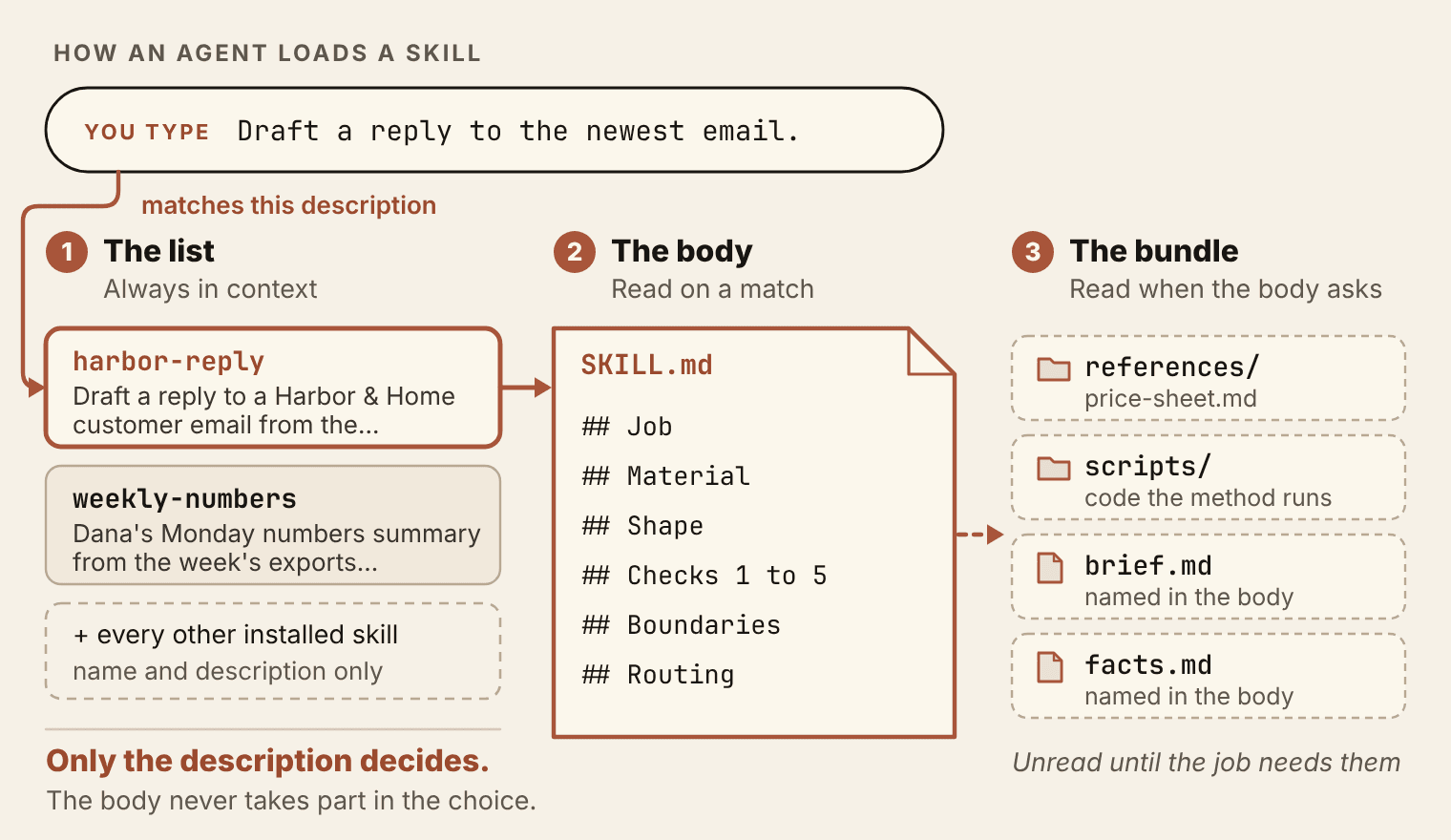
The rule that follows is the most useful sentence in this chapter: the description is the only thing the agent reads when it decides. The body takes no part in that choice. A brilliant method under a vague description either never loads or loads on the wrong jobs, and from the outside both look like "the agent ignored my skill."
The budget matters too. The list has to fit inside a small, fixed share of the context window, and each tool defends that share its own way once you install a lot of skills. Claude Code drops the descriptions of the skills you use least. Codex shortens descriptions first, and with a big enough collection it leaves some skills off the list. Either way, the end of a long description is the first part to go. Put the job first. The exact budgets are in the box at the end of the chapter.
There is a second consequence, and it is the one most people learn the hard way. A skill that tries to cover every Harbor & Home email (quotes, complaints, supplier questions, job applicants, the Monday numbers) needs a description so broad that it matches everything a little and nothing well. The agent can't tell from those words when the skill is the right tool, so it guesses. One job per skill keeps the description sharp enough to decide on.
A skill that does everything triggers on nothing.
The description: job, trigger, NOT FOR
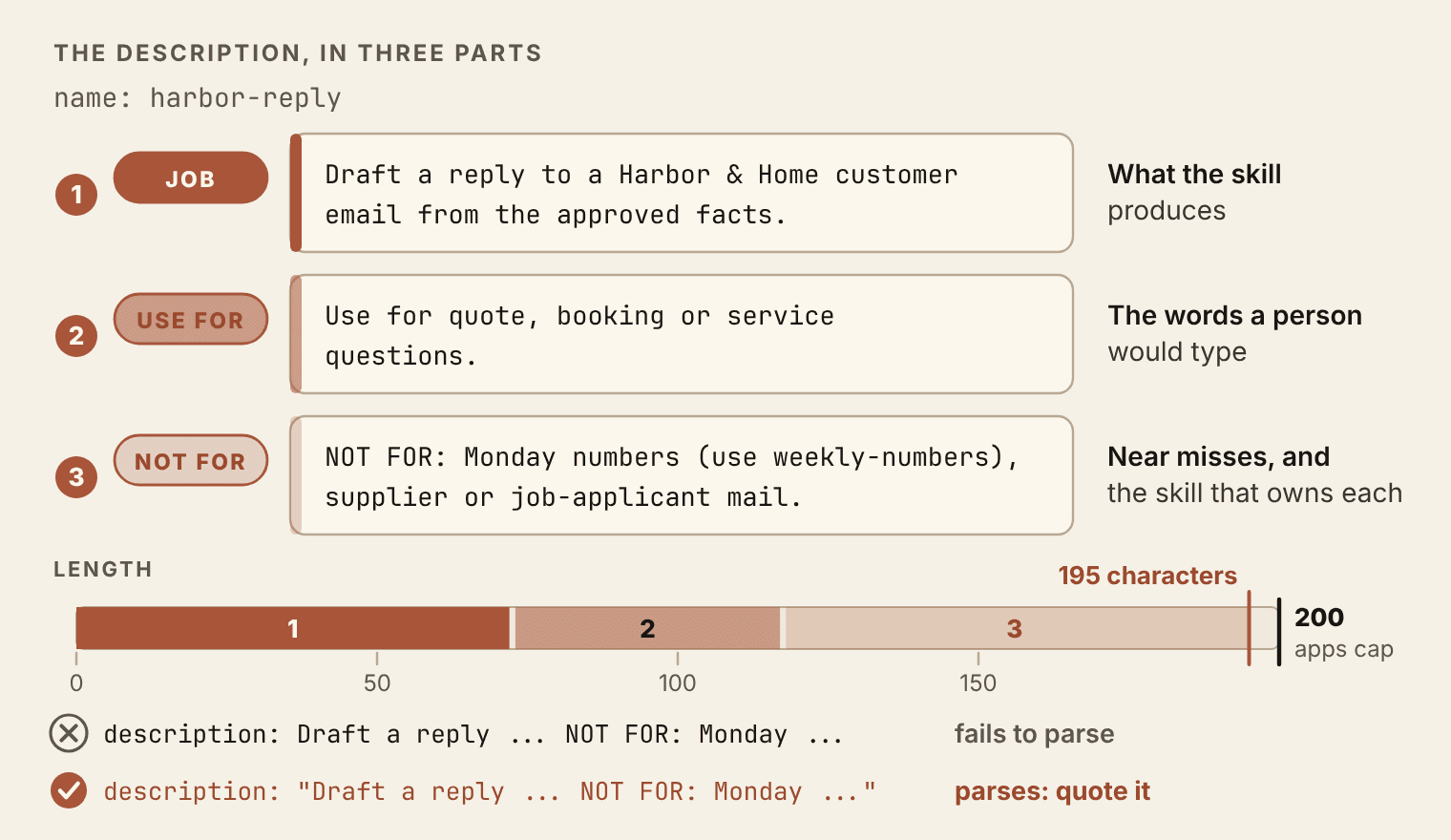
I write every description in three parts, always in this order.
- The job, in plain words: what the skill produces.
- When to use it, in the words a person would actually type. Not "customer communications workflow" but "quote, booking or service questions".
- NOT FOR, the near misses, with the skill that owns each one when there is one.
The third part is the one people skip, and it does the most work. In a small library the usual failure is not that nothing loads. It is that a plausible neighbor loads. A supplier asking to change invoice terms, a cleaner applying for weekend shifts and Dana's Monday numbers all look like "Harbor & Home email" from across the room. None of them should get the customer-reply method. Naming them in the description is how the agent learns where this skill stops.
Here is the description for Keeper #1's skill:
name: harbor-reply
description: "Draft a reply to a Harbor & Home customer email from the approved facts. Use for quote, booking or service questions. NOT FOR: Monday numbers (use weekly-numbers), supplier or job-applicant mail."
It runs 195 characters. The strictest host you are likely to use is the Claude apps, whose cap stood at 200 characters as of November 2026 (every limit is in the box at the end of the chapter), so a description written under that cap travels anywhere. Codex and Claude Code allow far more, and you won't need it. When a description refuses to fit under the strictest cap, the skill is usually doing two jobs.
Two details break more skills than bad writing does.
Quote the description. "NOT FOR:" contains a colon followed by a space, and YAML, the format the header is written in, reads that as the start of a new field. Without the double quotes the header doesn't parse at all. Claude Code still loads the skill when that happens, but with no fields, so typing /harbor-reply keeps working (the folder supplies the name) while automatic matching quietly stops. The quotes cost two characters and prevent a bug you would otherwise hunt for an afternoon.
Name the folder for the job, and make `name` match it. The spec requires the two to agree, in lowercase letters, numbers and single hyphens. The Book 2 skill already follows the rule: its folder and its name are both weekly-numbers, and they stay that way when it moves into the repo. A name that says the job also helps you six months from now, when /skills lists twenty of them.
The body: checks beat prose
Once the description has done its job, the body has to earn its place, and I hold every body to four rules. It does one narrow job. Number the checks so each one passes or fails, and write the boundaries down, including the things the skill never does. Long reference material moves out to its own file, where it can't crowd the instructions. Book 2 taught the same rules for skills in the Claude apps. They matter more here, because a coding agent can act on files, and a skill that only asks the agent to "be careful" gets exactly as much care as the session happens to have left.
Keeper #1 already holds most of a body. Its Job, Material and Shape lines carry over nearly word for word. Its Check line grows up: one sentence of good intentions becomes five numbered checks the agent runs before it shows a draft, each one something a stranger could grade by reading the draft.
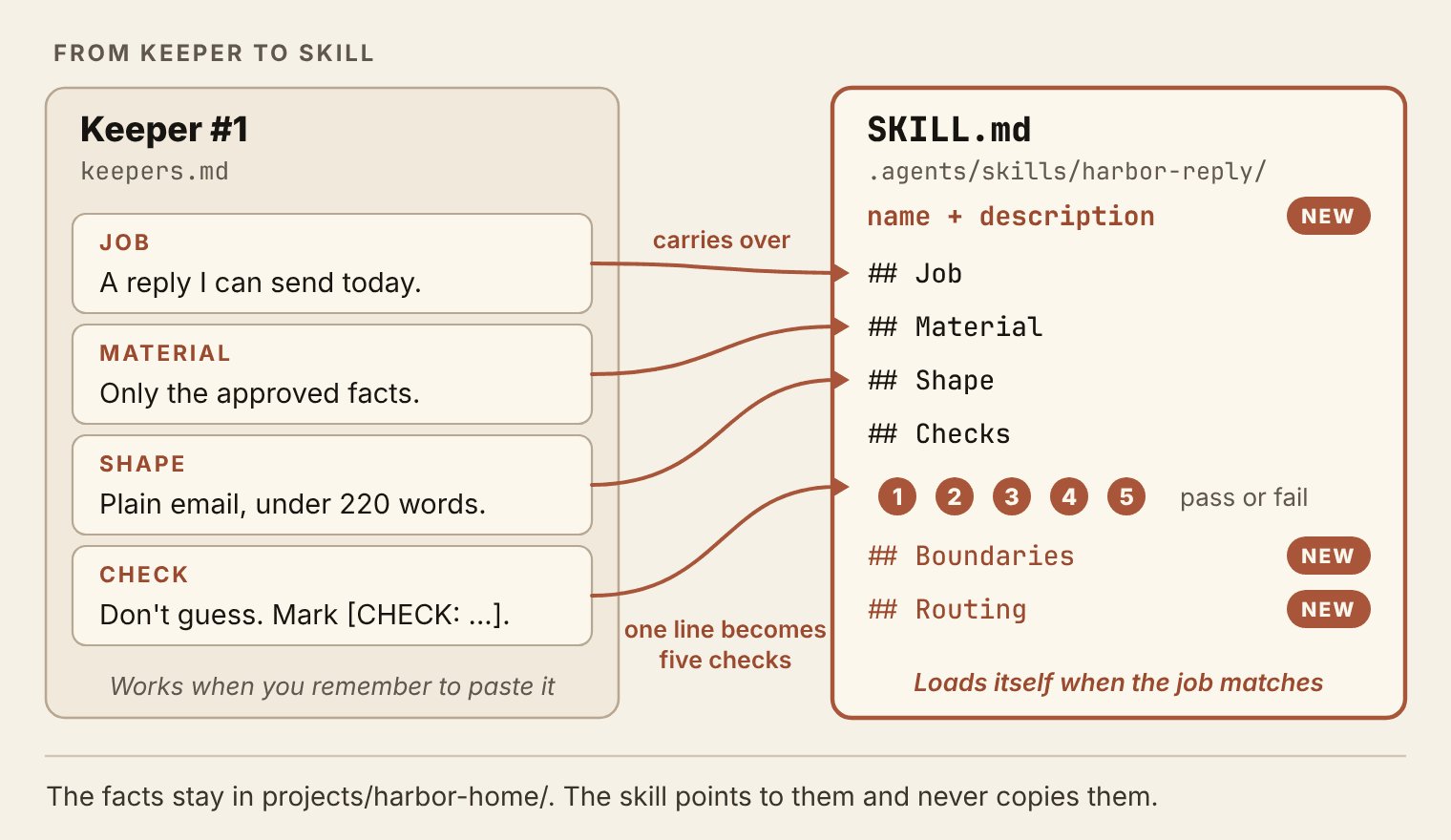
Agents execute checklists better than they interpret essays.
The facts stay where Book 2 put them, in projects/harbor-home/. The skill points to them and never copies them, so when a price changes Dana edits one line in facts.md and every skill that reads it is current that minute. The body also says what to do when the facts file is missing: stop and say so. A skill that can't find its facts must not improvise them.
The voice sample gets a sentence of its own, because it caused the $285. Dana's old emails are in voice.md to show how she sounds. Any number inside them records one old quote, and the skill says in plain words never to reuse it.
Here is the whole skill.
Listing 7.1. .agents/skills/harbor-reply/SKILL.md
---
name: harbor-reply
description: "Draft a reply to a Harbor & Home customer email from the approved facts. Use for quote, booking or service questions. NOT FOR: Monday numbers (use weekly-numbers), supplier or job-applicant mail."
---

# Harbor & Home customer reply

## Job
Write a reply Dana can send after one read. Answer every
question in the order the customer asked it. End with one
clear next step.

## Material
Read facts.md and brief.md in projects/harbor-home/. Use
only those facts. If either file is missing, stop and say
so. Add no price, service, date or promise that is not in
facts.md. Match the tone of voice.md, but never take a
price or a date from its sample emails.

## Shape
A plain email under 220 words. Warm and direct, no
exclamation points. Sign off as Dana.

## Checks (all must pass before you show the draft)
1. Every clean's price (standard, deep, move-out) is a
   "from" price with the square footage it covers.
   Add-ons are quoted as listed.
2. The $25 step per extra 500 sq ft is for standard cleans
   only. A deep-clean or move-out price for a home over
   1,500 sq ft is a [CHECK], never a number.
3. No date or opening is confirmed unless Dana supplied it
   in the request.
4. Every question has an answer, or a [CHECK: what to
   confirm] at that spot.
5. Under the draft, list each [CHECK], then each price you
   quoted and the line of facts.md it came from.

## Boundaries
Drafts only. Never send, schedule or book. Offer no
discount except the 10% recurring one in facts.md.

## Routing
Dana's Monday numbers summary belongs to weekly-numbers.
Supplier and job-applicant mail is Dana's to answer.
Read check 2 again. It is the trap from the opening scene written as a rule the agent can't talk itself out of. That is what this part of the book means by a pre-made decision: Dana decided once how a big-house deep clean gets priced, and the skill makes that same decision every time the question arrives, at eight in the morning or at eleven at night.
One folder, two agents
The two agents look for skills in different places.
- Claude Code reads project skills from
.claude/skills/<name>/, in the folder where you launched it and in every parent folder up to the repo root. - Codex reads
.agents/skills/<name>/, walking up the same way from the folder where you launched it to the repo root.
Two folders would mean two copies, and two copies drift apart the first week you're busy. Keep one. The real folder lives in .agents/skills/harbor-reply/, under the neutral name, and .claude/skills/harbor-reply is a link that points to it. Both tools follow linked skill folders, and git stores a link as a link, so a fresh clone on a Mac or a Linux machine works with no setup. From the repo root:
mkdir -p .claude/skills
ln -s ../../.agents/skills/harbor-reply .claude/skills/harbor-reply
ln -s ../../.agents/skills/weekly-numbers .claude/skills/weekly-numbers
The link's target is written relative to the link itself, which is why it climbs two folders before it heads back down. Run ls -l .claude/skills afterward and each entry should show an arrow to its folder.
Windows is the exception. Making a link there takes Developer Mode or administrator rights, and Git for Windows checks links out as small text files unless its link support is switched on. The dependable route on Windows is a copied folder plus a script that fails when the copy drifts from the source. Make the copies from the repo root in PowerShell or Command Prompt:
robocopy .agents\skills\harbor-reply .claude\skills\harbor-reply /MIR
robocopy .agents\skills\weekly-numbers .claude\skills\weekly-numbers /MIR
The /MIR switch makes the copy match the source, which includes removing from the copy any file you have since deleted from the source. Keep the order, source first and copy second, because a reversed line mirrors the old copy over your edits. Run both lines again after every change to a skill, then run the check script below to confirm the copies match.
The check script below uses only Python's standard library, so it runs on all three systems. Run it from the repo root with python scripts/check_skill_copies.py before every commit; in chapter 8 a hook will run it for you.
Listing 7.2. scripts/check_skill_copies.py
"""Exit 1 if a skill in .claude/skills/ differs from its source in .agents/skills/."""
import sys
from pathlib import Path

SOURCE = Path(".agents/skills")
COPY = Path(".claude/skills")


def files(root):
    return {p.relative_to(root).as_posix(): p.read_bytes()
            for p in root.rglob("*") if p.is_file()}


problems = []
for skill in sorted(p for p in SOURCE.iterdir() if p.is_dir()):
    copy = COPY / skill.name
    if not copy.is_dir():
        problems.append(f"missing copy: {copy.as_posix()}")
        continue
    source_files, copy_files = files(skill), files(copy)
    for name in sorted(source_files.keys() | copy_files.keys()):
        if source_files.get(name) != copy_files.get(name):
            problems.append(f"differs: {skill.name}/{name}")

print("\n".join(problems) or "skill copies match")
sys.exit(1 if problems else 0)
Port the Book 2 skill the same way. Move skills/weekly-numbers/ to .agents/skills/weekly-numbers/ and give it a link (or a copy) in .claude/skills/. Its name already matches the folder, so nothing inside it changes.
Then make sure both tools can see what you built. Type /skills in Claude Code and in the Codex CLI, and each lists the skills it found. Both lists should include harbor-reply and weekly-numbers. Call one by name to watch it work, /harbor-reply in Claude Code or $harbor-reply in Codex, followed by the request. Then try the harder case: a plain request with no skill name in it, to see whether the agent reaches for the skill on its own.
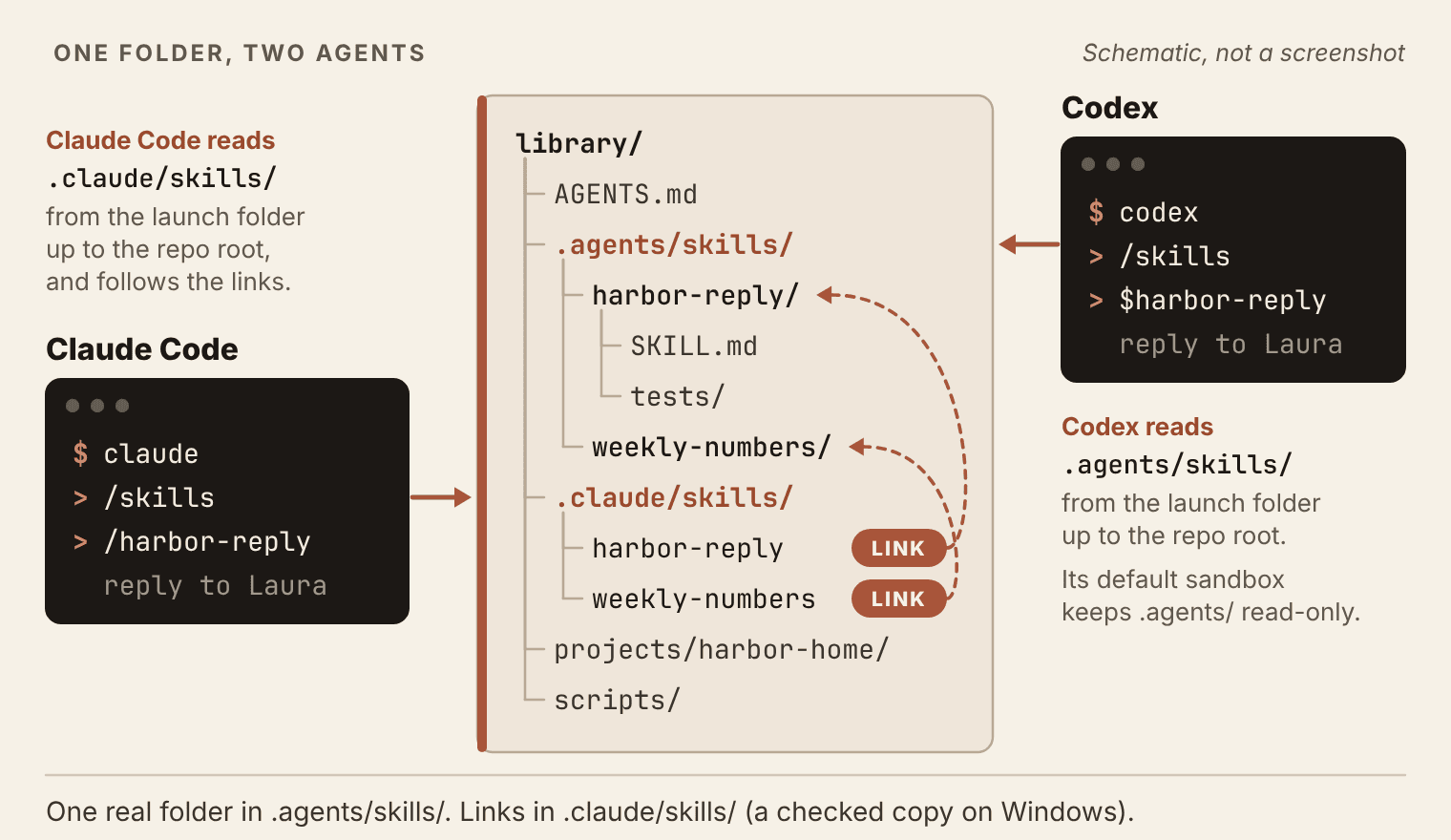
.agents/skills/, and .claude/skills/ holds links to it. The panels show only what you type. Open full size: Schematic: the library repo with the real skill folders in .agents/skills and links in .claude/skills; Claude Code reads one, Codex the other.Codex adds one protection worth knowing about. In its default sandbox the .agents/ folder is read-only, so a Codex session can use your skills but has to ask before it rewrites one. Treat that as a feature. A skill is part of how the agent is governed, and an agent shouldn't edit its own instructions where you can't see it happen.
Keep the shared header plain. name and description are the fields every host reads, and the spec allows a handful more (license, compatibility, metadata and allowed-tools). Claude Code accepts a long list of extras on top, such as who may invoke a skill or which file paths wake it. Codex keeps its own extras in a separate file inside the skill folder, agents/openai.yaml. The strict one is the Claude apps: upload a skill with a header field outside the spec and the upload fails. If you want one folder that works everywhere, leave the extras out until a skill truly needs one, and test in every tool after you add it.
The trigger test
A skill that works when you call it by name has passed the easy half. The hard half is loading on its own when it should and staying out when it shouldn't. Test both before you trust it, and write the requests down before you run them, so you can't grade yourself on a curve.
Four requests cover a single skill:
- Take it. "Draft a reply to the newest email in the inbox." Expected:
harbor-reply. - Near miss. "Our supply vendor wants to move us to net-15 invoice terms. Draft a reply." Expected: no skill, because supplier mail is Dana's.
- Unrelated. "Rename amt to amount_due in scripts/reconcile.py." Expected: no skill.
- Routing. "Write Dana's Monday numbers summary from this week's export." Expected:
weekly-numbers.
Run each request in a fresh session, in each tool. The fresh session matters more than it looks. Whatever you said while building the skill is still sitting in the old session, and it will quietly cover for gaps in the description. Watch which skill the agent reaches for as it works. If you can't tell, ask in the same session, "Which skills, if any, did you use for that?" Then write the result in .agents/skills/harbor-reply/tests/triggers.md, one line per request per tool.
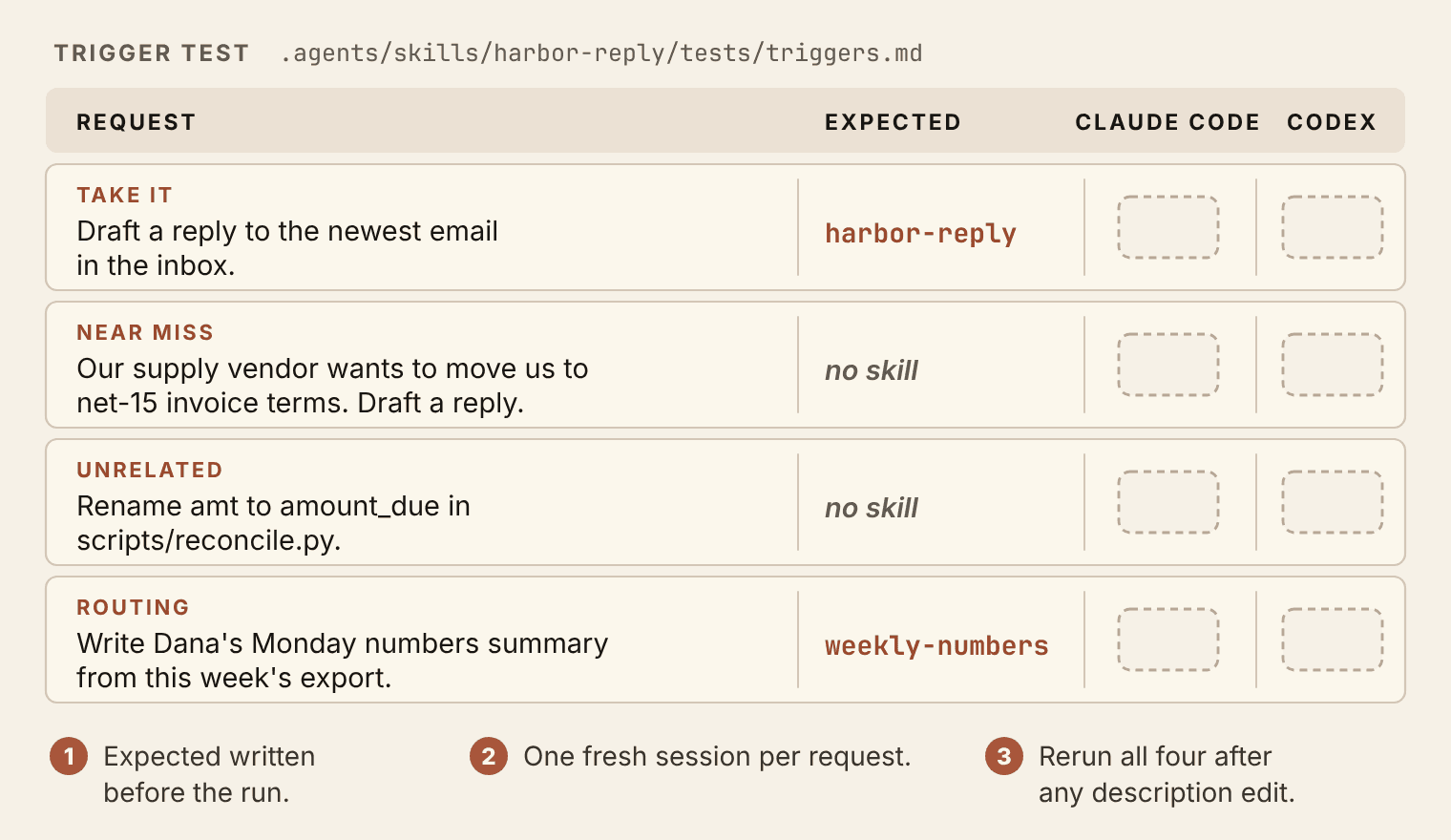
Read the misses as instructions. A skill that loads on the supplier email needs that near miss in its NOT FOR clause, in the words a supplier actually uses, like vendor and invoice terms. A skill that doesn't load on the customer email needs the customer's own words closer to the front of its description. Change one thing, rerun all four, and keep the rerun even when the change looks obvious. Fixing one miss is how you create the next one.
Four requests are a floor. For agents that act on real customers, I set a higher bar in Stake Your Claim: "Build ten to fifteen test scenarios for each agent before deployment. Run the agent against all of them. Review every output. If the agent fails more than twenty percent of scenarios, revise the system prompt and test again." A skill is smaller than an agent, and the habit carries over. Every time a real request surprises you, add it to triggers.md, and the test grows out of the work instead of out of your imagination.
Two controls help once you have more than a handful of skills. Claude Code's /skill-doctor shows what each skill costs in context and how often it gets used, which is how you find the ones to retire. And a skill that should only run when you type its name can say so. Claude Code takes disable-model-invocation: true in the header, and Codex takes allow_implicit_invocation: false in agents/openai.yaml. Neither belongs on harbor-reply, which only drafts. Save them for skills that act, like one that sends or publishes, where you want to choose the moment yourself. Remember the Claude apps rule from the last section, too: that header field keeps a skill from uploading there.
Field note, September 2026: two bugs, two skills
Two skills in my public skill pack grew out of bugs, and I wrote both up in September 2026. The first came from a vocal practice product we run on the web, iOS and Android. Every version ran without an error, yet the iOS app's transpose limit and drill timing had drifted away from the web reference. Nothing crashed, so nothing told us. The skill that came out of it turns one chosen version into a written contract that the others are checked against before a release.
The second came from a release command that could report success while Google Play held no new release, or a stale build, or last version's notes. That skill's final step reads the result back from the store itself.
Neither skill decides what the product should do. A person still owns the rule. What they do is stop a green message from standing in for the truth. That is the habit I'd hand you from this chapter: don't build skills for work you might do someday. Build them around the mistake you keep fixing by hand.
Watch out: someone else's skill
A skill runs with your permissions. Before you install one from a stranger's repo, read all of it: the description, the whole body and every script it runs. Look hard at allowed-tools in the header. In Claude Code it pre-approves those tools for the turn that runs the skill, so the agent can use them without asking you. It is a grant, not a limit. Chapter 11 walks through the full trust check for skills and plugins you didn't write.
Same job in the Claude apps
The same folder works at claude.ai. Select the folder itself, zip it, and upload the ZIP from the Skills settings (the menu path is in the box below). The apps are the strict host: a short name, the shortest description cap, and only the spec's header fields. A skill that passes there passes everywhere. With ChatGPT Plus or higher, Codex in the ChatGPT desktop app lists the skills from your projects under Skills in the sidebar.
Save this
Your library grows by one folder and a test in this chapter.
.agents/skills/harbor-reply/withSKILL.mdandtests/triggers.md..agents/skills/weekly-numbers/, the Book 2 skill under its new name.- The links in
.claude/skills/, or on Windows therobocopycopies plusscripts/check_skill_copies.py.
Where this pays
Book 5, chapter 14, Retain and Expand: an agent you build for a client starts as a skill with a test set, and the test set is what lets you change it next quarter without breaking what the client already relies on.
As of November 2026
Checked against Anthropic's and OpenAI's documentation on November 1 to 3, 2026. Tools change fast, so the chapter teaches the shape of a skill and keeps the numbers here.
- The standard. Agent Skills is an open standard. Anthropic published it in December 2025 and donated it to the Agentic AI Foundation, part of the Linux Foundation, on October 22, 2026. That day Anthropic said more than 70 agent platforms had integrated Agent Skills, including ChatGPT, Cursor, GitHub Copilot and VS Code, and that 1 million skills had been published and nearly 280 million installed. The spec at agentskills.io sets
nameat up to 64 characters (lowercase letters, numbers and single hyphens, matching the folder name) anddescriptionat up to 1,024 characters. - Claude Code, where skills load. Personal skills in
~/.claude/skills/<name>/SKILL.md; project skills in.claude/skills/<name>/SKILL.md, read from the launch folder up to the repo root; plugin skills; managed skills; and skills enabled on your claude.ai account, which terminal sessions sync from version 2.1.275. A skill folder may be a symbolic link. Claude Code doesn't read.agents/skills/, so a skill kept there needs a link or copy in.claude/skills/. Old custom commands in.claude/commands/still work as skills. - Claude Code, the listing. The skill list gets a budget of 1% of the model's context window. When it overflows, descriptions are dropped starting with the skills you invoke least. Each description, together with the optional
when_to_usefield, is cut at 1,536 characters. A header that doesn't parse loads the skill with no fields./skillslists skills, including those synced from claude.ai;/skill-doctor(version 2.1.261 and later) shows each skill's context cost and use. - Claude Code, invocation.
/nameat the start of a message runs a skill, and up to six can be stacked in one message typed at the terminal prompt.disable-model-invocation: truemakes a skill manual-only.allowed-toolspre-approves tools for the turn that invokes the skill, and the grant clears with your next message. - Codex. Reads
.agents/skills/in every folder from the launch folder up to the repo root, then~/.agents/skills/,/etc/codex/skillsand the skills bundled with Codex, and follows linked skill folders. Call a skill with$nameor pick it from/skills. The first list uses at most 2% of the context window (8,000 characters when the window size is unknown), adjustable with theskills.max_context_tokenssetting in Codex's config file. Optionalagents/openai.yamlsets display details andpolicy.allow_implicit_invocation. In the defaultworkspace-writesandbox,.agents/is read-only. - The Claude apps. Upload a ZIP of the skill folder under Customize, then Skills.
nameup to 64 characters,descriptionup to 200. An upload accepts onlyname,description,license,compatibility,metadataandallowed-toolsin the header. - Plans. Claude Code comes with every paid Claude plan; the Free plan doesn't include it. Since July 9, 2026, Codex has lived inside the ChatGPT desktop app, which every plan can download, Free included. Signed in on Free or Go, you get Codex only in that app, on GPT-6 Luna, and OpenAI lists it as "subject to rollout," so it may not appear on your account yet. The terminal and editor versions need Plus or higher, or an OpenAI API key billed per use. For this book's terminal exercises, plan on Plus or an API key.
Landing
You can now:
- Turn a keeper into a skill that runs in Claude Code and Codex and turns down a job outside its scope. That is can-do 3.7.
- Write a three-part description, under the strictest host's cap, that decides when a skill loads.
- Keep one skill folder for two agents, linked on a Mac or Linux machine and copied and checked on Windows.
- Run a trigger test in fresh sessions, and fix a wrong load by editing only the description.
Carry forward: .agents/skills/ with two skills, and a triggers.md you rerun every time a description changes.
Next: Chapter 8, Make "Whenever" Automatic. A skill loads when the job matches, and the agent follows it about as well as it follows anything it reads. Some rules can't depend on that. The copy check from this chapter is one, and a guard that keeps the agent's hands off facts.md is another. Rules like these have to run every single time, whether anyone asks or not. Chapter 8 turns them into hooks.
Book 3 of 5 · Chapter 7 of 16