
PART II · PROOF
A label is only as strong as the record behind it. This part builds the record while you work, shows it to strangers, and makes disclosure part of the value.
The answer is proof. Not reputation. Not talent. Not marketing.
By the end of this chapter you can:
- Explain in one sentence why a record made while you work beats one rebuilt later.
- Keep version history for a project, in git or in your document app.
- Fill an AI-use ledger in four parts: generated, written and decided, sourced, terms.
- Fingerprint a finished file, give it an outside date, and say what each record shows and what it leaves open.
That temporal priority is a permanent asset. It cannot be manufactured after the fact. It can only be created now and held forward.
If you are starting here
This is chapter 4 of 14 in Book 4, and it stands on its own. A few ideas from earlier in the series help, and you can pick them up in two minutes.
- `library/` is a folder of your own files that grows through the series: saved prompts, rules, notes about your work. This chapter adds two folders to it,
ledger/andreceipts/. - Git keeps every saved version of a folder, each with a date and a name on it. Book 3 sets it up. You don't need it here: Google Docs keeps version history on its own, and a dated copy covers Word.
- The terms card is a short note from chapter 2, one per AI tool, with the plan you were on and the date you read its terms. If you skipped chapter 2, write the tool name, plan and date under Terms in your ledger.
- Harbor & Home Cleaning is a business in Portland, Maine, run by an owner, Dana Ruiz. Sam Rivera does Dana's books part time and goes one step ahead of you through the series, making the mistakes first.
- Where the law matters, a dated box ends with questions to take to a lawyer. The note on the law at the front of the book says what that box is for.
You need a computer and about forty minutes for the three exercises. A free ChatGPT or Claude account covers the one that uses AI.
Three questions about March
Sam's reconciliation checker has run since March. It's the small program Sam built in Book 3 to match Harbor & Home's bank deposits against the week's invoices. It runs every night, flags whatever doesn't line up, and early every Monday it leaves Dana a one-page report to read before her first coffee. Dana relies on it now, and that's why her accountant, getting an early start on year-end, wants three answers before she leans on its numbers. Who wrote this program? Which parts came from an AI? Under what terms were those tools used?
For last week, Sam can answer in a minute. Every change in the git log carries a message that says what it did, and Monday's Claude Code session is still on the laptop.
March is another matter. The first dozen commits all say "update." The agent sessions from those weeks are gone, because Claude Code deletes its local transcripts after 30 days unless you change the setting, and nobody had changed it. Sam remembers asking the agent for the matching logic and fixing the date handling by hand. Which version of which function survived is a guess, and so is which terms applied that month.
So Sam writes down what probably happened. It reads like a story, because it is one.
Nothing in it is false, and nothing in it can be checked. The accountant has to decide how far to trust Sam's memory, and Sam spends an evening defending work that was fine all along. Sam's work was sound; what was missing was a dated page saying so.
Capture beats reconstruction
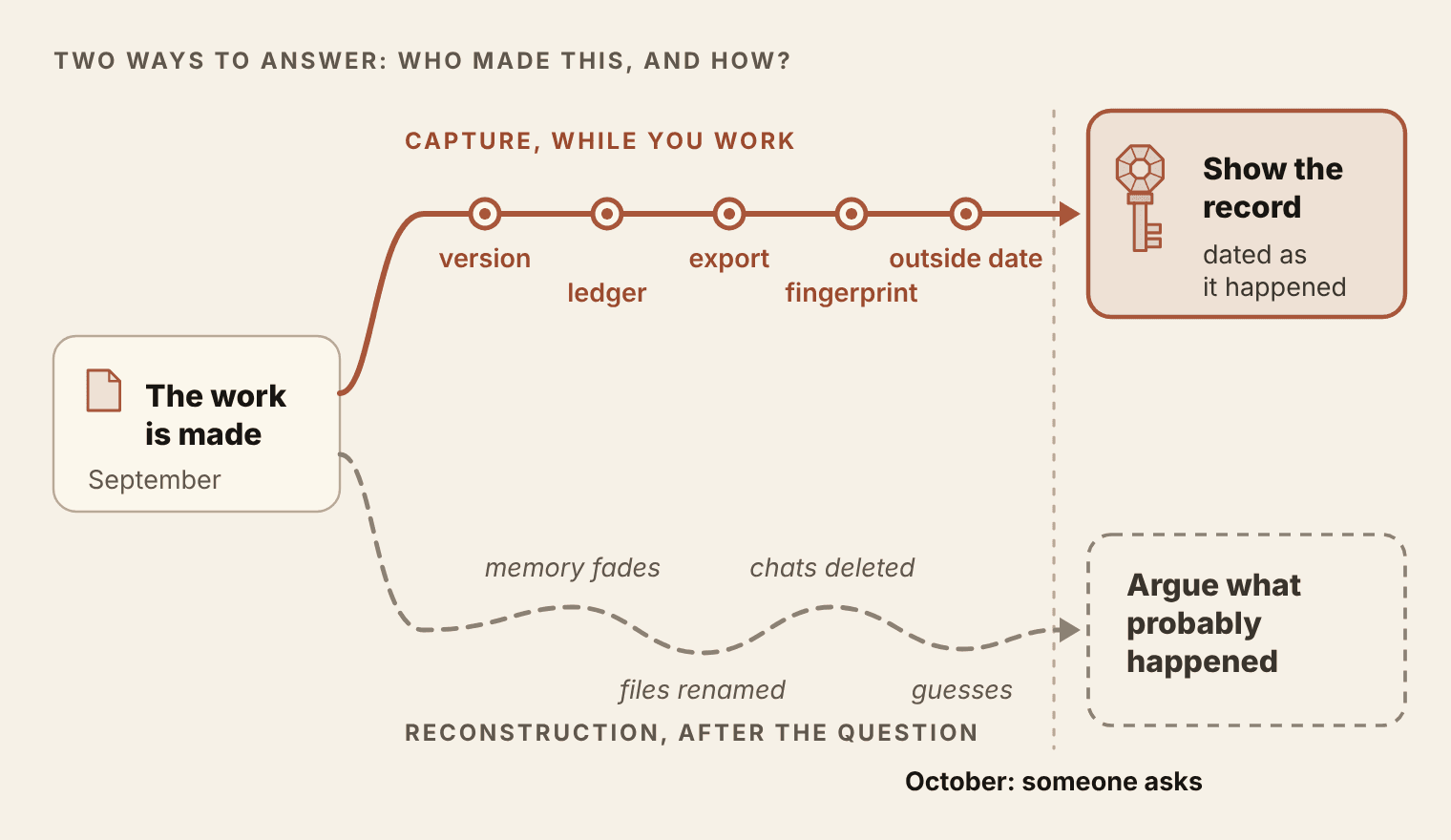
There are two ways to answer "who made this, and how?" You can rebuild the answer later from memory and whatever files survived. Or you can capture it while you work, a few lines at a time, so the answer exists before anyone asks.
Rebuilding feels free because it costs nothing until the question comes. Then it costs a lot, and you're the one who pays. I made this case at length in Proof as Infrastructure, and the short version goes like this. A painting carries its history in the paint, and a letter carries it in the handwriting and the paper. A digital file carries none of that. A copy is identical to the original, so neither can tell you where it came from. When origin isn't recorded at the start, somebody has to argue about it later, and the person who made the thing ends up doing that work unpaid. In that book I put the rule in six words: "Reconstruction is always weaker than origin."
The difference is in what each one asks. A reconstruction asks who probably made something, and "probably" invites argument. A record made at the time states what existed, when, and under what conditions. Conditions are hard to argue with, so the question often settles before anyone raises it.
AI turned this from an artist's worry into everyone's paperwork. When a decent page takes seconds to generate, the first question about a page moves from "is it good?" to "where did it come from?" You can watch the shift in ordinary forms. Amazon's Kindle Direct Publishing asks authors to disclose AI-generated text, images and translations. The US Copyright Office asks applicants to identify AI-generated material and leave it out of their claim. Client contracts and vendor questionnaires now carry questions like the accountant's. A consultant handing over a strategy deck can expect one, and so can a developer opening a pull request or a freelancer delivering a white paper. Most of them can't answer for last spring.
The line at the top of this chapter comes from a talk about registering work before new rules arrive. It holds for something smaller too: a date is the one part of a record you can't add later.
Proof is the foundation. You cannot own anything you cannot prove you made.
The law gives you the copyright when the work is fixed. Proof is what lets you use it: license it, set terms, hand it on, or defend it. Every later chapter in this book leans on that, so the habit comes first, and it's a small one: twenty minutes to set up, then about five at the end of each working session.
The envelope in the drawer
People have always tried to capture. Writers dated their notebooks. Inventors and writers sealed a draft in an envelope, mailed it to themselves and left it unopened in a drawer, trusting the postmark. Plenty of people still email a draft to themselves for the same reason.
The instinct is right and the tool is weak. A postmark shows that the post office handled an envelope on a certain day. It can't show what was inside when it was sealed or who wrote it, and envelopes can be opened and resealed. The US Copyright Office is blunt about the practice, which people call a "poor man's copyright": copyright law has no provision for it, and it isn't a substitute for registration.
You aren't unprotected without registration, though. In the US, your work is protected the moment it's created and fixed in a form someone can perceive. Registration is a separate step that matters most if you ever need to enforce your rights, and the dated box later in this chapter covers it.
Modern tools do the envelope's job far better. Each has a limit too, and the habit that makes them worth keeping is saying exactly what each one proves. Hold on to that through the rest of the chapter. Oversell a record and you hand the other side an easy way to discredit it.
Four records, one folder
Pick one project, the one you'd least like to reconstruct, and give it two folders in your library:
library/
  ledger/
    TEMPLATE.md          the blank entry
    harbor-checker.md    one ledger per project
    terms/               one card per tool (chapter 2)
  receipts/
    harbor-checker/      exports, fingerprints, timestamp proofs
Then build four records into the way you already work. Each takes minutes, and each answers a different part of the question. The first three are in this section. The fourth, a fingerprint with an outside date, gets the next one.
1. Version history
Version history is a record of every saved state of the work, each with a date and a name on it. If you worked through Book 3, you have it: the repo. Commit as you go, with messages that say what changed and who decided it ("Flag deposits over $500, Dana's call"), never a bare "update." Then push to a private remote, such as a private GitHub repository. A push puts a second copy on someone else's server, and the host keeps its own record. On GitHub, a repository's Activity view lists every push with the account that made it and when.
To tie each commit to you, sign it. Git can sign commits with an SSH key, the same kind of key many people already use to connect to GitHub. Add that key to GitHub as a signing key and your signed commits show a Verified badge. GitHub also stores a record of when it checked each signature, and nobody can edit that record afterward. The setup is three commands and one settings page, listed in the box at the end of this chapter.
No git? You still have version history. Google Docs keeps it on its own, and you can name a version at each milestone ("Sent to the client, Oct 26"). Word keeps it only for a file saved to OneDrive or SharePoint, lists versions by date and time, and has no way to name one. It doesn't keep them for long either: Microsoft's OneDrive help says file versions are kept for 30 days. So in Word, at each milestone also save a copy with the date and milestone in its file name. Either way, mark a version every time the work leaves your hands.
2. The AI-use ledger
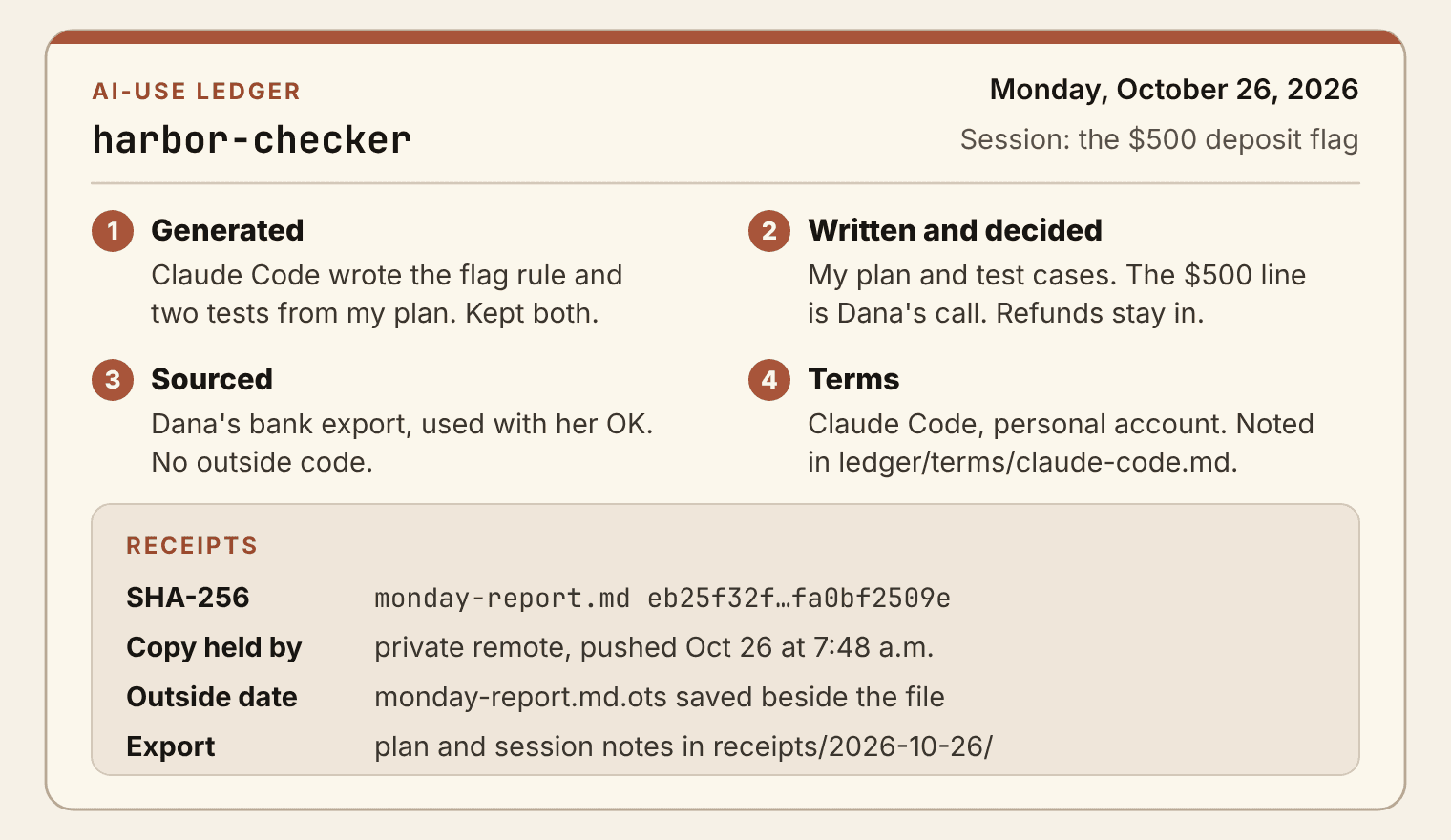
The ledger is a short, dated page per project that says what the tools did and what you did. I first wrote it up in an essay called "AI Ate the Demo. It Doesn't Get the Deed." It works the same way for a report, a deck or a codebase, in four parts:
- Generated. What a tool produced, which tool, the date, and whether it survived into the final version.
- Written and decided. What you wrote, chose, cut, arranged or turned down. People skip this part, and it's the part that shows authorship.
- Sourced. Anything from another person, such as a photo, a quote, a template or a dataset, with the permission or license.
- Terms. Each tool you used and the terms that applied at the time, linked to the terms card you made in chapter 2 and keep in
ledger/terms/.
Write an entry at the end of each working session. Once it's a habit, it takes about five minutes. For work you've already done, write entries now and mark each one "reconstructed" with today's date. A labeled gap beats a confident guess. As I put it in that essay, "Accuracy about uncertainty is still accuracy."
The ledger is honest with you before it is honest for you.
The first person a ledger helps is you. Sam's March entries, written in August and marked reconstructed, turned up a gap before the accountant read a word: nobody could say who wrote the rule that handles refunds, the one every Monday total depends on. So Sam reread that rule line by line, tested it against three weeks of real deposits, and logged the review as that day's work. A vague memory became a dated entry.
3. Exported originals
Keep what produced the work, along with the work itself. A final PDF tells nobody how it was made. The source files, the chat that shaped the draft and the plan file from a coding session do.
Chats are the fragile part. At the end of a session that mattered, save the conversation into the project's receipts folder: copy it into a text file or print it to PDF. Once a month, request a full export of each AI account you use. ChatGPT and Claude both offer one in their settings and email you a download link.
Coding sessions are more fragile still. Claude Code deletes its local session transcripts after 30 days unless you raise cleanupPeriodDays in your settings. Codex keeps its transcripts in ~/.codex/sessions until someone deletes them, and nothing records which session produced which change. Neither is a record you control. If a session matters, copy what you need into the repo before it ages out, and keep the plan and handoff files from Book 3 in the repo, where nothing deletes them on a schedule. Read a transcript before you commit it, though. It can hold anything the session read, passwords and keys included.
The fingerprint and the outside date
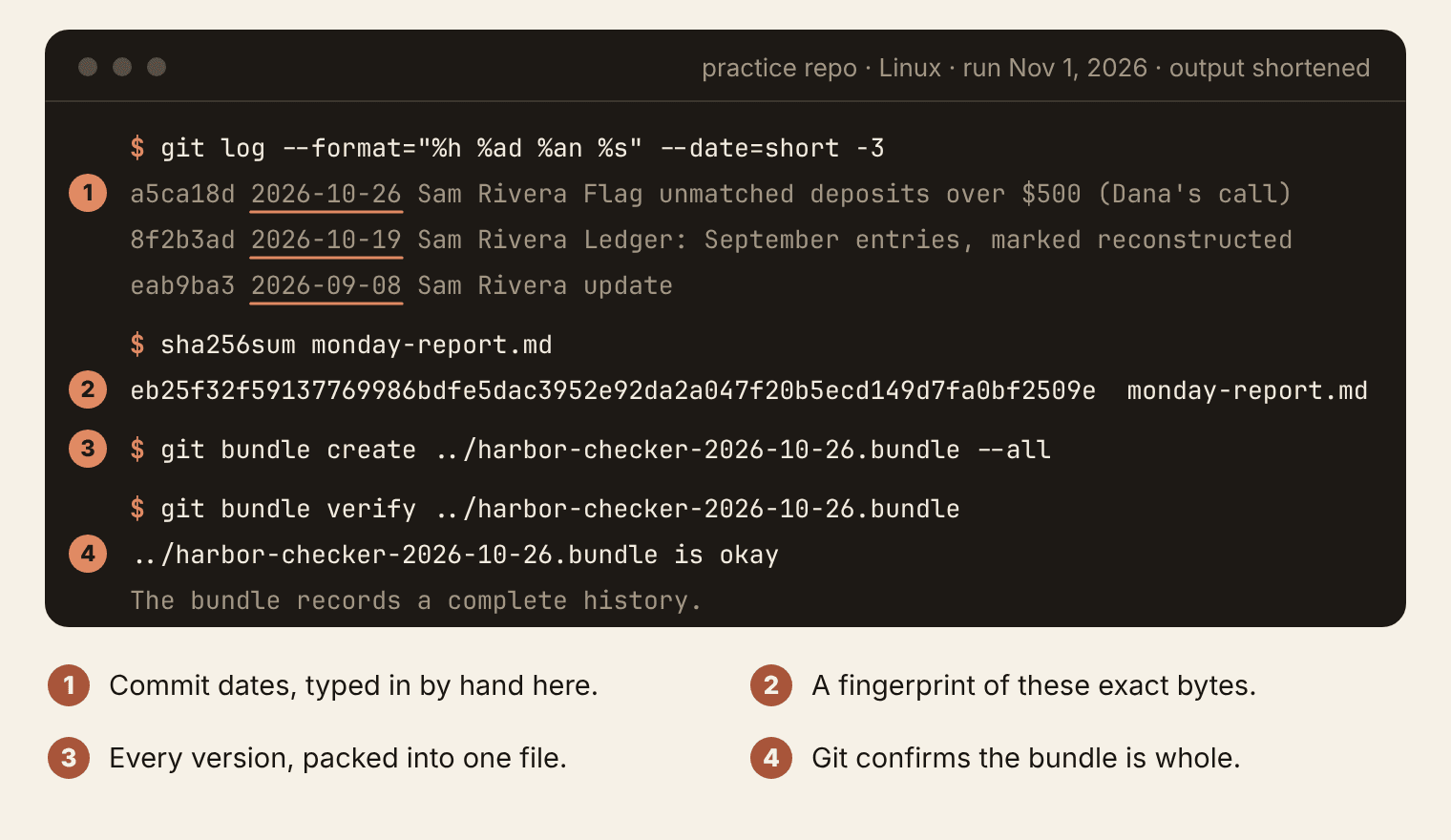
The fourth record is the smallest and the most exact. A SHA-256 hash is a 64-character fingerprint computed from a file's bytes. The same file always gives the same fingerprint, and changing a single character gives a completely different one. Any computer can make one, free, in seconds.
Open a terminal in the file's folder and run the command for your system:
macOS                 shasum -a 256 monday-report.md
Linux                 sha256sum monday-report.md
Windows PowerShell    Get-FileHash monday-report.md
PowerShell uses SHA-256 unless you tell it otherwise, and it prints the hash in capital letters. Case doesn't matter when you compare two hashes. Copy the result into the ledger's receipts block.
A fingerprint pins down which bytes you mean, but not when they existed. For that, give the fingerprint a date that someone else holds. Two ways cost nothing, and a registry adds a third.
- OpenTimestamps. It needs no account. Drop the file on opentimestamps.org, which computes the fingerprint in your browser, so the file never leaves your computer. Or run
ots stamp <file>afterpip3 install opentimestamps-client. Keep the.otsfile it gives you next to the original; at first it's only a pending proof. After a few hours, when the stamp is confirmed in a Bitcoin block, runots upgradeon it, or drop the.otsfile and the original on opentimestamps.org again, which downloads the finished proof. Keep that finished.otsfile; it no longer needs the calendar servers. Anyone can check it by dropping the original file and its.otsfile on opentimestamps.org. - A trusted timestamp (RFC 3161). A timestamp authority such as FreeTSA signs your file's fingerprint together with the time, and anyone with OpenSSL can check the signed reply. Keep the authority's certificate files with it.
- A registry. Suede AI's registry at registry.suedeai.ai records a file's fingerprint, a signed creator claim, the contributors and a timestamp. A registry entry is provenance evidence: a dated, signed record of who claimed the file and when, which anyone can check. For copyright registration, use the US Copyright Office below.
Either kind of timestamp shows that these exact bytes existed by that time. Neither shows who made them. Pushing the ledger to your own repository helps too, but it is a record you can still delete, so it doesn't replace an outside timestamp.
Whichever you choose, keep the exact file you fingerprinted. Edit it and lose the original, and the fingerprint matches nothing you still have.
For a whole project, git can do one more useful thing: pack the entire repo, every version and its history, into a single file called a bundle, then check that the file is whole. Store the bundle somewhere outside the project, and the history survives even if the laptop doesn't.
Field note, July 2026: the copy that made the cut safe
In July 2026, before I pruned my public GitHub profile repository, I saved its full prior state: three archive files and a git bundle. I checked each archive against its SHA-256 fingerprint and ran git's own verify command on the bundle. Only then did I make the cut. Receipts usually prove something to other people. That day they did a second job, because a verified copy of the original meant I could undo a big change instead of hoping I'd never need to.
What each record proves, and what it doesn't
No single record settles who made something. Each covers part of the question and leaves a gap that another fills.
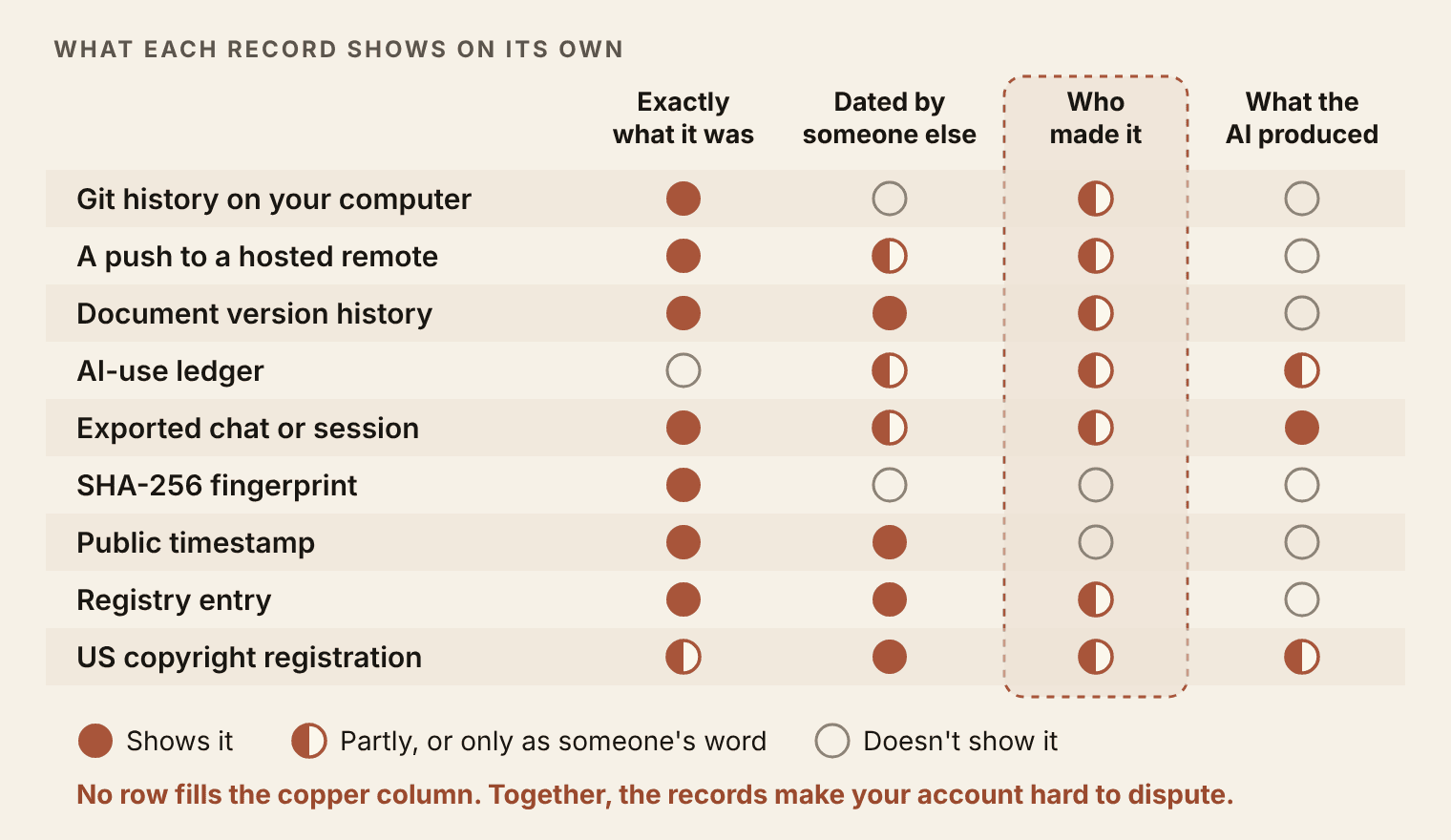
Here is the same grid in words, one record at a time.
- Git history on your computer shows exactly what changed, in order. The dates come from your own clock, and anyone at the keyboard can set them.
- A push to a hosted remote adds a date someone else keeps: the host's record of when the commits arrived and which account sent them. You can still delete that record along with the repository. An account isn't a person, and a signed commit narrows it to whoever holds the key.
- Document version history shows each saved version under an account name, dated by the app's servers. It can't show who typed which word.
- The AI-use ledger is your own account, written at the time, which is why people believe it. It's the only record that says which parts of the final work came from a tool, and it shows only what you wrote down.
- An exported chat or session shows what the tool was asked and what it returned. It can't show what you changed afterward, outside the tool.
- A SHA-256 fingerprint identifies exact bytes, and nothing about who or when.
- A public timestamp shows those bytes existed by a stated moment. It doesn't show that you were first, or that you made them.
- A registry entry adds a signed public claim and the contributors. A claim is still a claim.
- US copyright registration puts your claim on the public record. If you register within five years of publication, a court treats the certificate as prima facie evidence, meaning the court presumes what it says is true until the other side shows otherwise. It still rests on what your application says, and the application is where you disclose AI-generated material.
Evidence organizes your story. It does not adjudicate it.
Keep that boundary in mind whenever you show a record to anyone. A good folder doesn't win an argument for you. It changes what the argument is about. Without records, the other side's cheapest move is "prove it." With them, that move is gone, and the conversation turns to what the records actually show.
The law, dated (checked November 1, 2026)
- In the US, copyright protects a work from the moment it's created and fixed. Registration is voluntary.
- You have to register before you can sue for infringement of a US work. Registered works may also be eligible for statutory damages and attorney's fees in a successful suit.
- Copyright law has no provision for mailing yourself a copy, and doing so doesn't substitute for registration.
- The Copyright Office's registration guidance, in place since March 2023, asks applicants to disclose AI-generated material that is more than minimal, exclude it from the claim, and briefly describe what the human author contributed. The Office's January 2025 report on copyrightability explains its reasoning.
Questions to ask a lawyer: Should I register this work, and when? How do I describe its AI-generated parts on the application? If someone disputed my authorship, which of my records would carry the most weight where I live?
Twenty minutes, then five a session
The setup takes twenty minutes, once. After that, the habit is a five-minute close at the end of every working session:
- Save, then commit or name the version (in Word, save a dated copy).
- Write the ledger entry.
- Export the chat or session that mattered.
- Fingerprint anything final and give it an outside date.
- Write one line about what comes next.
That close is adapted from a five-minute session close I wrote earlier, widened to any kind of work. Put it at the top of the project's ledger as a checklist. If you have Book 3's tools, make it automatic with an end-of-session hook or a small script that adds a dated ledger stub and the fingerprints for you. A step you have to remember is the step that gets skipped on a busy Thursday, and the record you end up needing is always from a busy Thursday.
Sam's step. Sam's first close went wrong. Sam fingerprinted Monday's report and stamped it, then fixed a typo before sending it to Dana, so the proof described a file nobody had received. The repair was to fingerprint only the copy that goes out, after the last edit, and leave that copy alone. Sam's close now takes about four minutes most Mondays: a commit with a real message, three ledger lines, the session plan copied into receipts/, and the report fingerprinted and stamped. When the accountant asked about August, Sam sent a folder instead of a paragraph.
Stake Your Claim ends with the closing remarks from the tour, a composite of the talks in several cities, and they turn on two words.
I want to close with the two words that organize everything we have talked about today. Proof. And ownership.
This chapter built the first word into your week. The rest of this book is about the second.
Save this: ledger/ and receipts/
library/ledger/TEMPLATE.md, the four-part template from the last exercise.library/ledger/<project>.md, with today's entry and the five-minute close at the top.library/receipts/<project>/, with the export, the fingerprint and the timestamp proof.
Where this pays
Book 5, chapter 7, Receipts Sell. The records you keep for yourself become the receipts a buyer checks before paying you.
As of November 2026
Checked November 1 to 3, 2026 against each provider's own documentation. Tools change, so the chapter teaches the habit and keeps the menu paths here.
- Commands. Figure 4.3 is a real run on Linux with git 2.43. On macOS,
shasum -a 256ships with the system. In Windows PowerShell,Get-FileHashuses SHA-256 by default.git bundle create <file> --allpacks a repo into one file, andgit bundle verify <file>checks it. - Commit signing with SSH. Needs Git 2.34 or later. Run
git config --global gpg.format ssh, thengit config --global user.signingkeyfollowed by the path to your public key (the file ending in.pub), thengit config --global commit.gpgsign true. On GitHub, open Settings, then SSH and GPG keys, add the same public key and set its key type to Signing Key. Hover over a Verified badge to see when GitHub checked the signature. - GitHub Activity view. On a repository's main page, choose Activity, to the right of the file list. It shows pushes, merges and force pushes with the account behind each.
- Google Docs. At each milestone choose File, then Version history, then Name current version, and type the milestone. A document holds up to 40 named versions, and File, then Version history, then See version history shows them all. The owner of a personal Google account can delete version history, and deleting it removes only the versions that haven't been named.
- Word. Version history works only for a file saved to OneDrive or SharePoint: click the file name at the top of the window and choose Version history (on a Mac, Browse Version History). Versions are listed by date and time, with no names, and Microsoft's OneDrive help says they're kept for 30 days.
- Exports. Claude: Settings, then Privacy, then Export data, on the web or in the desktop app (the phone apps don't offer it). ChatGPT: Settings, then Data controls, then Export data. Both email a download link that expires 24 hours after it arrives. On team and business plans, the workspace owner controls exports.
- Claude Code transcripts. Saved under
~/.claude/projects/on your machine and deleted after 30 days by default. ThecleanupPeriodDayssetting changes the number of days. Transcripts aren't encrypted, and anything a session reads can end up in one. - Codex transcripts. Kept in
~/.codex/sessionswith no automatic expiry, until someone deletes them withcodex deleteor/deletein a session. - OpenTimestamps. opentimestamps.org. Free, no account. The fingerprint is computed in your browser and the proof confirms within a few hours. The
.otsyou get first is pending. The next day, drop the file and its.otson the site again (or runots upgradewith the command-line client) so the proof picks up its Bitcoin confirmation, then keep the upgraded.otswith the original. - Trusted timestamps. FreeTSA (freetsa.org) is a free RFC 3161 timestamp authority. It replaced its signing certificate in March 2026, so keep the certificate files you checked with beside each token.
- Suede AI's registry. registry.suedeai.ai records a fingerprint, a signed creator claim, contributors and a timestamp, so a buyer can check who claimed the file and when.
- US Copyright Office. copyright.gov answers the registration questions in its general FAQ. Its work on AI, including the registration guidance and the January 2025 report, is collected at copyright.gov/ai.
Landing
You can now:
- 4.4 Put one real project under a dated record in twenty minutes.
- Explain why a record made at the time beats a story rebuilt later.
- Keep a four-part AI-use ledger, with reconstructed entries labeled as such.
- Fingerprint a file, give it an outside date, and say what each record shows and what it leaves open.
Carry forward: library/ledger/ and library/receipts/, plus the five-minute close at the end of every session.
Next: Chapter 5, Receipts, Not Claims. Your records are private so far. They prove things to you and to anyone you choose to show. Chapter 5 decides which ones a stranger gets to see, builds a public receipts page out of them, and makes sure anything your agents publish carries your name.
Book 4 of 5 · Chapter 4 of 14